1
Signal loss on one or some channels
3. You can refer to the website www.antennaweb.org for lists of which channels in
your area are currently broadcasting digital signals. If the channel or channels
you are missing is/are still in analog, you can view the channel(s) using the
TV’s built-in tuner. To view analog channels, press the ANALOG PASS-THRU
button on the CM-7000PAL DVR remote control, then change channels on
your TV using your TV’s remote control. When you want to return to watching
digital channels using your CM-7000PAL DVR, change back to the correct TV
channel (3 or 4) or input/source, and press the ANALOG PASS-THRU button
on your CM-7000PAL DVR remote control again.
GETTING HELP
2. Your CM-7000PAL DVR is only able to tune in digital over-the-air channels.
If you are missing some channels, it is possible that some of them are channels
that are still broadcasting analog signals.
T roubleshooting
1. Try a different channel. Sometimes, just one channel may be experiencing a
problem, while other channels are fine. If all channels are experiencing the
problem, go to the previous section, Signal loss on all channels. If just one
channel or a few channels seem to have a problem, then continue with Step 2.
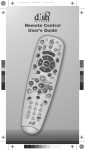
Remote is not working
1. Verify the batteries are installed according to the battery diagram in the
remote control.
2. Try changing the batteries in the CM-7000PAL DVR remote control.
Batteries should all be of the same type and size.
3. Make sure you are pointing the remote control directly at the front panel of
the CM-7000PAL DVR. The remote uses infrared (IR) signals to operate the
CM-7000PAL DVR (and any other equipment you have programmed in the
other device modes), and therefore must have line of sight to the front of the
CM-7000PAL DVR (or other equipment).
Forgot password for locks
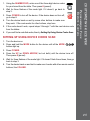
1. Locate the Receiver ID number by pressing MENU on the CM-7000PAL DVR
remote control, selecting Setup, System Setup, then System Information.
Write down the Receiver ID number (before the dash).
2. To reset your password, press MENU on the CM-7000PAL DVR remote control,
select Setup, then Locks. Enter the last four digits of your Receiver ID number
(before the dash) as a temporary password, then select Change Password
to choose a new password. When prompted for your old password, you must
re-enter your temporary password before you can enter and then confirm a
new password.
43