1
S E T U P
M E N U
O P T I O N S
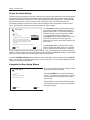
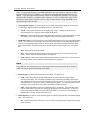
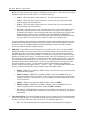
Audio Format Setup
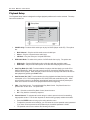
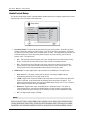
The “Audio Format Setup” section of the Setup Menu system allows you to configure preferences for audio
output formats. The menu items in this section are:
Setup Menu
Playback Setup
Secondary Audio
Off
Video Setup
HDMI Audio
LPCM
Audio Format Setup
Coaxial/Optical Output
LPCM
Audio Processing
LPCM Rate Limit
192k
Device Setup
SACD Output
PCM
Network Setup
HDCD Decoding
On
Exit
Set the secondary audio program mixing option
Exit
1. Secondary Audio: To set the Secondary Audio Program mixing option. Some Blu-ray Discs
contain a secondary audio and video program, such as the director’s commentary. Some Bluray Discs have a sound effect when you make menu choices. This Setup Menu item allows you
to decide whether to mix the Secondary Audio Program and menu clicking sound into the
primary audio. The options are:
•
On – The Secondary Audio Program and menu clicking sound are mixed into the primary
audio. Usually this will cause the primary audio volume to be slightly reduced.
•
Off – The Secondary Audio Program and menu clicking sound are not mixed into the
primary audio and you cannot hear the secondary audio or menu clicking sound. This
setting preserves the highest possible audio quality for the primary audio.
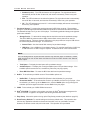
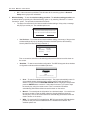
2. HDMI Audio: To select digital audio output format from the HDMI port. The options are:
•
Auto (default) – The player checks with the device connecting to HDMI output to
automatically determine which audio format to use.
•
LPCM – Digital audio output via HDMI will be multi-channel Linear PCM format. When this
option is selected, compressed audio bit streams will be decoded by the player. This
setting is recommended when connecting the HDMI output directly to a TV or to a receiver
without advanced audio decoding capabilities.
•
Bitstream – Digital audio output via HDMI will be in bitstream format. This option is
recommended when connecting the HDMI output to an A/V receiver or processor that
supports advanced audio decoding, such as Dolby TrueHD and DTS-HD Master Audio.
•
Off – No digital audio output via HDMI.
NOTE
If you use HDMI to connect audio to an HDMI A/V receiver or audio processor, it is important
that you choose 720p or higher HDMI output resolution when playing high resolution audio
content (DVD-Audio, SACD, Dolby TrueHD and DTS-HD Master Audio). According to the HDMI
specification, the bandwidth available for audio is proportional to the total bandwidth used by
62