1
It may be necessary to change the trigger type that the MX3 reacts to, depending on the type of
device you are hooking up. In most cases, you want to trigger when the signal is FALLING, that
is - the moment the I/O is pulled to the common line. However, for some applications, such as
monitoring the PC port of a camera to know when an exposure is complete, you want to trigger
when the signal is RISING, that is - the moment the I/O line is released from the common line.
To change the input trigger type, you can use the In Trigger parameter inside of the Aux I/O
menu.
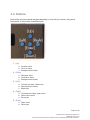
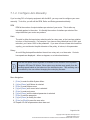
Menu Navigation:
1.
2.
3.
4.
5.
6.
7.
8.
9.
[Enter] to enter the Main System Menu
[Up] or [Down] until Settings is selected
[Enter] to enter Settings menu
[Up] or [Down] until Aux I/O is selected
[Enter] to enter Aux I/O menu
[Up] or [Down] until In Trigger is selected
[Enter] to edit the In Trigger parameter
[Up] or [Down] to change the parameter value
[Enter] to save the parameter value
9.3. Output Program Actions
All four Aux. I/O lines can be configured as outputs. This is especially useful if you must inform
another device before taking a shot (such as turning on lights) or after taking a shot (such as
moving a rotary table).
All four I/O lines can be used as outputs if you desire. You may select an output to trigger before,
or after an exposure is taken.
9.3.1. Output Before Exposure
When output before exposure is chosen, you can control how long before the exposure the
output is triggered with the Out B4 Time parameter (in milliseconds), and you can control how
long the output is triggered for with the Out B4 Trig mS parameter. Both parameters are
available in the Aux I/O menu.
Page 34 of 45
Copyright © 2013 Dynamic Perception LLC
dynamicperception.com
All Contents licensed under the Creative Commons Attribution Share-Alike 3.0 License