1
English
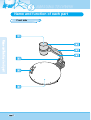
Name and function of each part
Terminals at the back
French
German
POWER INPUT TERMINAL
VGA VIDEO OUTPUT
Use this to connect the power cable. (DC12V)
Connect this to the RGB input terminal of a PC
monitor or a projector by supplied PC cable.
VGA VIDEO INPUT
When Lightbox is used you can connect the
Lightbox cable to the INPUT terminal located next
to the switch of the Lightbox.
DC 12V OUT, 0.6A
Connect this to the VGA output terminal of
another device by supplied PC cable.
When external input menu is selected, the image
is shown through the VGA input terminal.
DVI OUTPUT
USB: COMPUTER CONNECTION
TERMINAL
Connect this to the monitor or projector by
supplied DVI cable.
Use this to connect PS/2 Mouse. (See page 17.)
RS-232C: COMPUTER CONNECTION
TERMINAL
Use this to connect RS-232C cable.
Use this to connect USB cable when transmitting
image to a PC by USB port.
Spanish
MOUSE
Italian
LIGHTBOX POWER OUTPUT
TERMINAL