1
FLS Platinum Installation Instructions
FLS Platinum Operating Instructions
Fitting the Video Interface Box
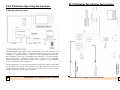
Diagnostics
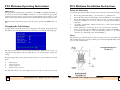
This screen displays some diagnostic information about the unit. It shows the software
version of both the transmitter box and the display, the status of the communications
link with the transmitter box, the transmitter dc voltage supply and also tests the
settings memory on the display (EEPROM).
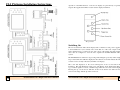
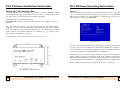
The Video Interface box is designed to be mounted onto a panel or bulkhead and has
two brackets for this purpose. It should be located in position so that the keypad (with
2m cable) can be postioned near the chosen display instrument.
See diagram below for mounting dimensions.
Important Note: Please check actual measurements before drilling to allow for
tolerances.
Two video cables are provided - one composite video cable (2m, 4 pin mini-din plug to
plug) and one s-video cable (2m, RCA plug to plug). The appropriate cable should be
used, depending on the video input of the display device. An adapter may be required
if the connector on the display instrument is of a different type (eg. composite video
can sometimes be a BNC type connector).
See the diagrams on pages 26-29 for how to connect the video box.
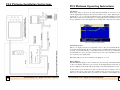
Diagnosic Data
‘Trans Box Comms Status’ should read ‘Connected OK’. Any other messages mean an
error has occured on the communications link with the transmitter box. If this is the
case, the user should ensure that the transmitter box has power and the data link cable
is connected securely at both ends (transmtter box and display).
‘Trans Box Tx Volts’ should read approximately 12 Volts. If the transmitter box
supply voltage is at exactly 12 Volts, then the Tx Volts should be about 9-10 Volts.
This will result in slight reduced peformance but should still perform well. If 14 Volts
or more are supplied to the transmitter box, maximum transmit power will be achieved.
Factory settings can be restored by pressing the up arrow key on this page.
Box Mounting Dimensions
22
FLS Platinum Video Engine Instruction Manual
FLS Platinum Video Engine Instruction Manual
11