1
8. Configuration of the assemblies
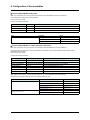
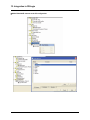
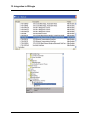
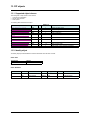
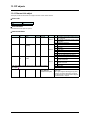
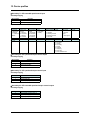
b Control via EtherNet/IP in Drivecom profile
Note: This configuration can only be used if the communication scanner assemblies (100 and 101) are selected.
The command and the setpoint come from EtherNet/IP.
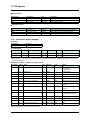
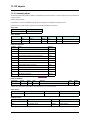
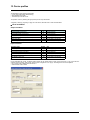
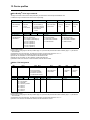
Configure the following parameters:
Parameter
Value
Comment
Profile
Separate Drivecom profile
The run commands are from the Drivecom profile. The command and the
setpoint can come from different channels.
Setpoint 1 configuration
Network card
The setpoint comes from EtherNet/IP.
Command 1 configuration
Network card
Command 1 comes from EtherNet/IP.
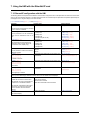
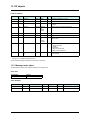
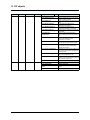
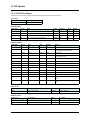
Configuration via the graphic display terminal or the integrated display terminal:
Menu
Parameter
Value
[1.6 - COMMAND] (CtL-)
[Profile] (CHCF)
[Separate] (SEP)
[Ref.1 chan] (Fr1)
[Com. card] (nEt)
[Cmd channel 1] (Cd1)
[Com. card] (nEt)
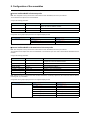
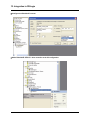
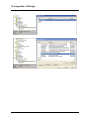
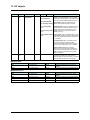
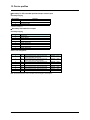
b Control via EtherNet/IP or the terminals in Drivecom profile
Note: This configuration can only be used if the communication scanner assemblies (100 and 101) are selected.
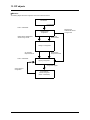
The command and the setpoint both come from EtherNet/IP or the terminals. Input LI5 is used to switch between EtherNet/IP and the
terminals.
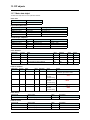
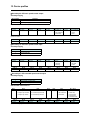
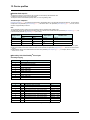
Configure the following parameters:
Parameter
Value
Comment
Profile
Separate Drivecom profile
The run commands come from the Drivecom profile. The command and
the setpoint can come from different channels.
Setpoint 1 configuration
Network card
Setpoint 1 comes from EtherNet/IP.
Setpoint 2 configuration
Analog input 1 on the terminals
Setpoint 2 comes from input AI1 on the terminals.
Setpoint switching
Input LI5
Input LI5 switches the setpoint (1 ↔ 2) and the command.
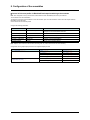
Command 1 configuration
Network card
Command 1 comes from EtherNet/IP.
Command 2 configuration
Terminals
Command 2 comes from the terminals.
Command switching
Input LI5
Input LI5 switches the command.
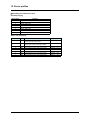
Note: Setpoint 2 is directly connected to the drive controller reference limit. If switching is performed, the functions that affect the reference
(summing, PID, etc.) are inhibited.
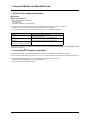
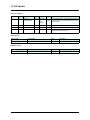
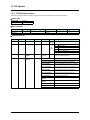
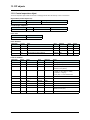
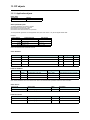
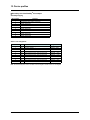
Configuration via the graphic display terminal or the integrated display terminal:
Menu
Parameter
Value
[1.6 - COMMAND] (CtL-)
[Profile] (CHCF)
[Separate] (SEP)
[Ref.1 chan] (Fr1)
[Com. card] (nEt)
[Ref.2 chan] (Fr2)
[AI1 ref.] (AI1)
20
[Ref. 2 switching] (rFC)
[LI5] (LI5)
[Cmd channel 1] (Cd1)
[Com. card] (nEt)
[Cmd channel 2] (Cd2)
[Terminals] (tEr)
[Cmd switching] (CCS)
[LI5] (LI5)