1
Touch Screen Operation
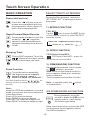
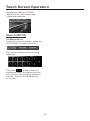
AUX Operation
On the front panel of this unit, there is an
AUX IN jack, follow the diagram below to
connect analogue replay devices(only
for the Audio connect, if you want to
connect the Video, please plug the
<Video input > on the back of the unit .) .
Use this jack to replay sound of other
replay equipment such as Digital Video
players, computers, etc. Via the loudspeakers.
AUX INTERFACE 1
1). Please connect the external device
with stereo jack (3.5mm)plug the Aux in
socket .
AUX IN JACK FRONT PANEL
AUX IN
AUX IN
AUX INTERFACE 2
Ground
Right
Left
3). You now hear the sound from the
external device played back through
the loudspeakers .
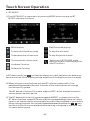
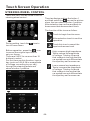
The function of the icons as follow:
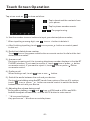
2). In radio mode, touch the screen
of “
” ICON to enter the main menu,
touch the “ AUX ” ICON to enter the
AUX IN mode .
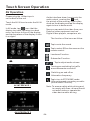
Tap to mute the sound.
Tap to select EQ as the same on the
remote control.
In AUX mode, tap
icon that the
display turn dark,tap twice turn dark
more, tap thrice to turn off the display,
and tap anywhere of the display to turn
it on again.
Loudness Function.
Subwoofer Function.
Tap to adjust audio volume.
Turning pre-switching for traffic
announcements on and off
Switching on and off an
Alternative frequency
Tap to turn to BT PHONE mode.
(after pairing and connecting a mobile
phone with BT function).
-23-