1
Destron Fearing
User Manual
GENERAL COMMAND FORMAT
The Reader commands are made of two or more characters followed by a carriage return, as
illustrated in the following example:
RA1↵
Generally, the first two letters designate the command group and the remaining letters/digits
designate the command parameters. The commands are not case sensitive and are echoed as
they are typed. The backspace key can be used to correct an improper command.
READER PROMPT
After pressing the Enter Key on the keyboard, the Reader returns a prompt that indicates the
profile number currently selected.
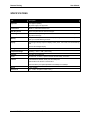
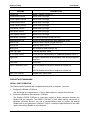
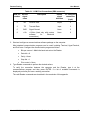
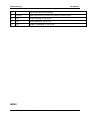
The following table is a list of the serial console port commands.
AU
Auto Tuning
BL
{1|0|S}
Display Backlight {1} On,{0} Off,{S} Saving
CE
{1|0}
Tags Counter {1} On,{0} Off
CO
{U|R|S}
Secondary console port {U} USB,{R} RF,{S} RS-485
CS
{bps}
Set Serial Communication Speed
DF
{H|D}
Display Tag ID {H} Hexadecimal,{D} Decimal
DT
Display Current Date and Time
DU
{HH:MM:SS}
Unique Mode Delay in Seconds
FC
{SS,NAME}
File Close and Create New {SiteID, File Name}
FD
{number|A|C}
File Download {number},{A} All,{C} Current Files
FE
{number|A|C}
File Erase {number} {A} All,{C} Current Files
LD
{1|2|3}
Read Led Act Time {1} 30ms, {2} 250ms, {3} 500ms
MB
{HH:MM:SS}
Break Mode Time in Seconds
MS
{0|A|U|I}
Store Mode {0} Off,{A} All,{U} Unique,{I} Id
MU
{5|1|0|D}
Unique Mode {5} 5 Tags,{1} 1 Tag,{0} Off,{D} Delay
RA
{1|0|Z}
Reader Active {1} On,{2} Off,{Z} Shutdown
RB
{1|0}
Reader Beeper {1} On,{0} Off
RC
Reset tag counter
RI
{0-255}
Change Reader ID
SI
{0-100}
Change Site ID
Model AXIZ SB-1 User Manual - 03-13-2008 – Revision A
45