1
SYSTEM SETTING
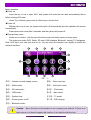
Remote control operation introduction
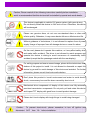
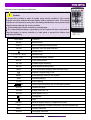
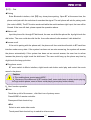
Caution:
1. Service life of battery is about 6 months under normal conditions. If the remote
controller cannot be operated normally, battery shall be replaced in time. If the remote
controller is out of service for a long time, the battery shall be taken out to prevent liquid
leakage that can damage the remote controller.
2. Prevent falling the remote controller to avoid damage.
3. Do not dismantle the battery, or put battery into fire or place with other metal articles.
Place the battery of remote controller in a safe place to prevent the children from
swallowing the battery.
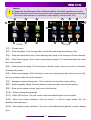
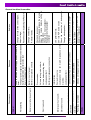
Key name
MODE
PIC(5)
Function
Mode switch
EJECT
Key for ejecting/suctioning disc
OPEN
upender turns out and recovers
Power on/off
1.2.3.4.5.6.7.8.9.0
VOL+ VOL-
Numeric key
Increase/decrease volume
MUTE
Turn on/off sound
UP DN
Screen angle adjusting
SETUP
Enter system setting menu
INFO
DVD information display, Navi shortcut keys
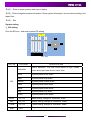
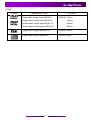
Repeat a signal song or file
MENU
RAN
SCAN
OK
Enter primary menu of the system
Random playing
Scan playing
Selecting &confirming key for left/right/up/down
SRCH
Search and play
ZOOM
Image zoom out 1:4
SLOW
Slow speed 1/2-1/7
/
Play/pause
Stop
ANGLE
PIC
Various angles playing ( supported by disc)
Adjust brightness ,contrast, saturation; use with direction key
SUB-T
Subtitle selection
AUDIO
Language selection
6