1
Remote Control
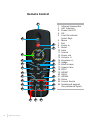
Using the Remote Control
20
www.i3-learning.com
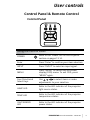
Infrared transmitter
Sends signals to the projector.
LED
LED Indicator.
Power
Refer to the “Power On/Off the
Projector” section on pages 15-16.
Exit
Press “Exit” to close the OSD menu.
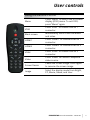
Zoom in
Zoom in the projector display.
Reset
Return the adjustments and settings
to the factory default values. (except
for lamp counter)
Zoom out
Zoom out the projector display.
OK
Confirm your item selection.
Source
Press “Source” to select an input
signal.
Auto
Automatically synchronizes the
projector to the input source.
Four Directional
Select Keys
to select items or make
Use
adjustments to your selection.
Keystone +/-
Adjust image distortion caused by tilting the projector.
Volume +/-
Adjust to increase / decrease the
volume.
Aspect ratio
Use this function to choose your desired aspect ratio.