1
3-5
Parameter List
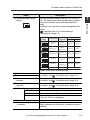
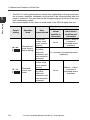
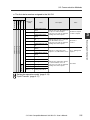
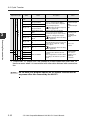
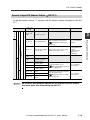
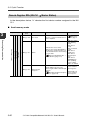
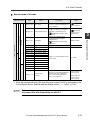
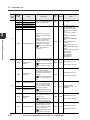
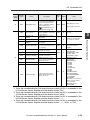
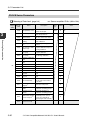
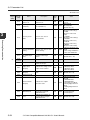
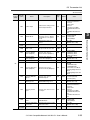
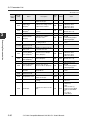
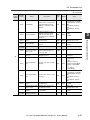
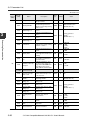
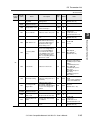
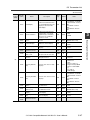
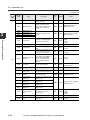
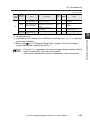
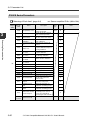
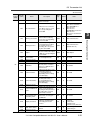
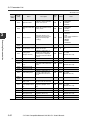
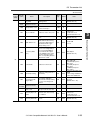
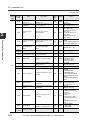
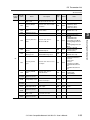
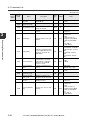
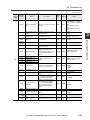
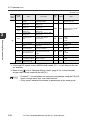
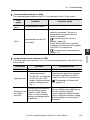
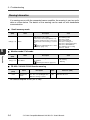
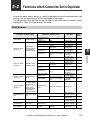
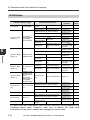
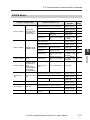
The parameters used with handshake communication are listed below.
NU-CL1 Parameters
"Meaning of Each Item" (page 3-4)
Data
Data No.
category
(HEX)
(HEX)
Name
nn: Sensor amplifier ID No. (00 to 10h)
Description
Data
type
Attribute
3
Value
nn00
:
Depends on the sensor amplifiers connected.
nnFF
01
0000
All Unit Key Lock
Executes or cancels the
designated key lock set for
all amplifiers.
UINT
W
0: Cancel
1: Key lock
2: PIN key lock
3: Communication key
lock
02
0000
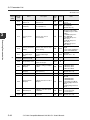
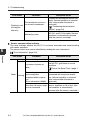
Output
When the ON/OFF output of
each ID number sensor is
ON, the corresponding bit
turns ON.
WORD
R
Bit0: ID No. 01 sensor
:
Bit15: ID No. 16 sensor
0001
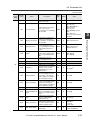
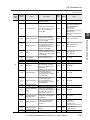
Current Value Over
Range*1
When the current value of
each ID number sensor
exceeds the upper limit, the
corresponding bit turns ON.
WORD
R
Bit0: ID No. 01 sensor
:
Bit15: ID No. 16 sensor
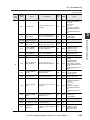
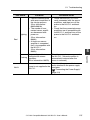
0002
Current Value Under
Range*2
When the current value of
each ID number sensor
exceeds the lower limit, the
corresponding bit turns ON.
WORD
R
Bit0: ID No. 01 sensor
:
Bit15: ID No. 16 sensor
0003
Current Value
Invalid*3
When the current value of
each ID number sensor is
invalid, the corresponding
bit turns ON.
WORD
R
Bit0: ID No. 01 sensor
:
Bit15: ID No. 16 sensor
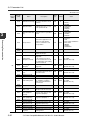
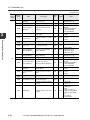
0004
Current Value
Property*4
When the current value of
each ID number sensor
exceeds the upper/lower
limit or is invalid, the
corresponding bit turns ON.
WORD
R
Bit0: ID No. 01 sensor
:
Bit15: ID No. 16 sensor
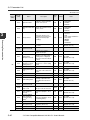
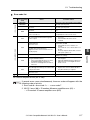
0040
Error Information
Indicates the error
information when an error
occurred on the NU-CL1 or
sensor amplifier.
WORD
R
"Error Information"
(page 5-6)
R
Bit0: Error status
Bit1: Warning status
Bit2: Sensor ready
Bit3: 0 fixed
Bit4: Sensor setting error
Bit5: Sensor external
input busy
Bit6: Sensor EEPROM
busy
Bit7: Updating sensor
setting
Bit8 to 15: 0 fixed
03
0041
Status
Indicates the status of all
connected sensors as OR.
*Refer to the remote input
[RX18 to 1F] when the
operation mode is set to
monitor/full mode for the
meaning of each status.
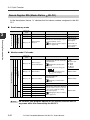
"Remote Input RX (NUCL1 J Master Station)"
(page 3-17)
WORD
- CC-Link Compatible Network Unit NU-CL1 User's Manual -
3-27
Executing Communication
00