1
Running Simulations
Now that our model has been constructed, we are ready to simulate the system. To do this, go to
the Simulation menu and click on Start, or just click on the "Start/Pause Simulation" button in
the model window toolbar (looks like the "Play" button on a VCR). Because our example is a
relatively simple model, its simulation runs almost instantaneously. With more complicated
systems, however, you will be able to see the progress of the simulation by observing its running
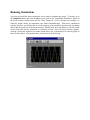
time in the the lower box of the model window. Double-click the Scope block to view the output
of the Gain block for the simulation as a function of time. Once the Scope window appears,
click the "Autoscale" button in its toolbar (looks like a pair of binoculars) to scale the graph to
better fit the window. Having done this, you should see the following: