1
ADJUSTMENT
Windows EDID V1.0 User Manual
2. EDID Read & Write
1) Run WinEDID.exe
Operating System: MS Windows 98, 2000, XP
Port Setup: Windows 98 => Doesn’t need setup
Windows 2000, XP => Need to Port Setup.
This program is available for LCD Monitor only.
1. Port Setup
a) Copy “UserPort.sys” file to
“c:\WINNT\system32\drivers” folder
b) Run Userport.exe
2) Edit Week of Manufacture, Year of Manufacture,
Serial Number
a) Input User Info Data
b) Click “Update” button
c) Click “ Write” button
c) Remove all default number
d) Add 300-3FF
e) Click Start button.
f) Click Exit button.
A
9
IBM
Compatible PC
Video Signal
Generator
15
10
5
6
1
5
C
13
se
d
PARALLEL PORT
1
5V
RS
No
23
2C
tu
25
OFF
14
ON
LL
EL
F
RA
PA
5V
Power inlet (required)
ON
WE
R
220
VG
CS
T
MO
NIT
OR
B
Power Select Switch
(110V/220V)
Power LED
4.7K
OFF
74LS06
E ST Switch
B
F V-Sync On/Off Switch
(Switch must be ON.)
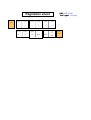
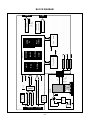
Figure 1. Cable Connection
- 13 -
4.7K
4.7K
5V
E
YN
A
PO
S
V-S
Control Line
C
11
6
1
74LS06