1
Appendix B. CR23X Wiring and Programming
location by 100. The last step is to use P45 again to take the integer portion of
the input location for seconds. The result is hour/minutes in one input location
and seconds in another.
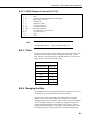
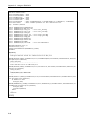
The latitude and longitude can be parsed with the P15 instruction when decimal
delimiter is on. If P15, parameter 2 is 6x, where the x selects the baud rate,
every non-numeric value and decimal point will act as a delimiter. The
Degrees and Minutes will be placed in one input location, and the minute
fractional portion will be placed in the next input location. The decimal
delimiter preserves the resolution of the original measurement.
Further parsing of the latitude and longitude may be necessary. Longitude
degrees and minutes can range in value up to 18059, which exceeds the low
resolution format of the dataloggers final storage area. Either parse the latitude
and longitude degrees and minutes the same way the time was parsed, or store
the data in high-resolution format.
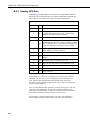
The GPS quality number can be used to determine if you have a valid GPS fix
and if the datalogger received the data properly. Use P89 to test if the GPS
quality number is greater than or equal to one. There is a catch to using the
GPS quality number to verify your data. P15 will write to fifteen input
locations if everything works correctly. If P15 fails to read the GPS data, only
the first input location is written to. The GPS quality number will be
unchanged. If P15 fails to read the GPS data, the value displayed in the first
input location will be 99999. The datalogger actually stores FFFFFFFFh, a
very large number. The time field includes six digits, which can be greater
than 99999. This limits the usefulness of the time field as a test for a valid
GPS fix. A better approach is to overwrite the GPS quality location with zero
before executing P15. Use P30 to overwrite one input location.
If the GPS time is used to set the datalogger clock, the GPS time must be
parsed into three input locations: Hour, Minutes, Seconds. P114 is used to set
the datalogger clock to match values in input locations. Some time will have
passed between the GPS fix and when the program table reaches the P114
instruction. Adjustments can be made by adding a second or two. Be careful
about setting seconds to a number greater than 59. You can also correct the
UTC time to local time. Table based dataloggers require year, day, hour,
minute, and seconds to use P114. Only hour, minutes, and seconds are
available from the $GPGGA string. The PGRFM string includes the month,
day and year, but is difficult to use.
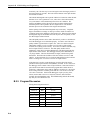
B.2.5 Program Discussion
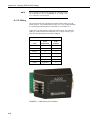
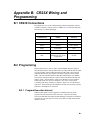
Wiring when using Instruction 15:
B-4
Function
Color
Datalogger Connection
Power in
Red
12 volts
Power ground
Black
Ground
Power switch
Yellow
ground
TXD
White
C5
PPS
Gray
C8
Ground
Blue
Rx data for reconfig
Shield
Shield
Ground