1
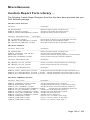
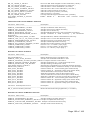
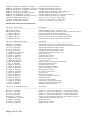
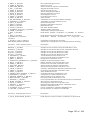
17.) Click-on a Check Mark for the desired Tenant Certification form and click-on
OK
Note: The selected Tenant Certification form will be generated at the currently
defaulted Windows printer.
Activating the Tenant Certification ...
The activation process actually moves the new tenant in by putting Tenant
Certification information into effect and is completed when the tenant and owner
have signed the hard copy Tenant Certification.
Access - From the Main FHA Software menu ...
1.) Click-on RD or HUD or LIHTC
2.) Click-on RD 3560-8 or HUD-50059 or Sec.42 Certification
Note: A Find - Tenant Certification window will appear
3.) Click-on the desired Tenant Name/Unit No. in the list and click-on OK
Note: The Tenant Certification window should now appear.
4.) Click-on Activate
5.) Verify &/or Modify Tenant & Owner Signature Dates
6.) Verify &/or Modify Voucher/Worksheet Date this tenant change will effect.
7.) Click-on OK
8.) Click-on OK to acknowledge a Successful Activation.
9.) Click-on File .. Exit to return to the Main FHA Software Menu.
Note: If this new tenant was in Waiting List Data, a Leased Date entry will
automatically be recorded in this tenant's Applicant Information record to match the
actual Move-In Date.
Note: DO NOT electronically transmit a move-in Tenant Certification until the day
the tenant has physically moved-in to the unit. Tenant Certifications with future
Move-In Dates are generally not accepted by RD MINC and HUD TRACS systems.
Recertify - Existing Tenant Certification ...
Recertification of an existing tenant involves adding a new tenant certification entry
in the Tenant Certification Database ( Recertify ), updating existing household
member information carried over from the previous TC, calculating & saving the
new TC, generating a hard copy Tenant Certification and then activating that
Tenant Certification when the tenant signs the hard copy TC.
Page 60 of 142