1
Preparation
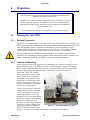
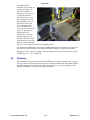
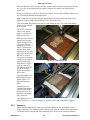
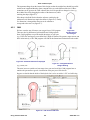
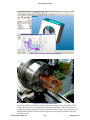
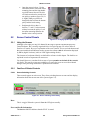
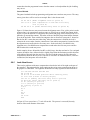
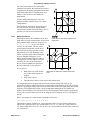
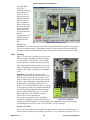
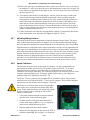
You might find the
directions of movement are
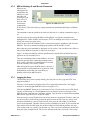
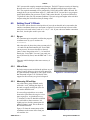
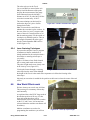
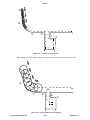
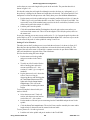
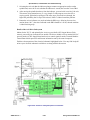
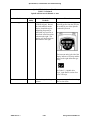
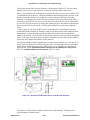
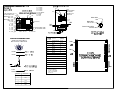
unexpected. Figure 2.20
shows the tool above a
work piece. The positive X,
Y and Z directions are
marked by arrows. If you
press the Right arrow key
then the tool will move in
the positive X direction
(i.e., to the right of the
work). Similarly the Up
arrow moves the tool in the
positive Y direction (i.e.,
towards the PCNC
column). Of course, this
actually happens on the
PCNC by the table moving
under the tool but you must
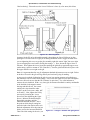
Figure 2.20 – Jogging is to move the tool relative to work
imagine what it would look
like if you were sitting on the table and watching the tool.
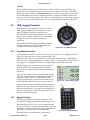
You should jog around until you are quite confident which way the machine moves when you
press any key. Notice that the values in the Axis DROs change as you jog the tool around.
Jogging the Z-axis is done by using the Page up and Page down keys. Here of course it is the
tool that moves, so “Up” is indeed up.
2.8
Summary
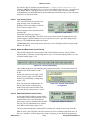
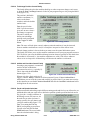
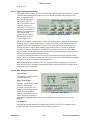
This chapter has covered a lot of basic ground. Much of it only has to be done once. You may
however wish to revisit the latter parts if you are not fully confident with using buttons, DROs,
the MDI and jogging. We will give less detail on using these (e.g., assume you know about
shortcuts and when to use Enter) in subsequent chapters.
Using Tormach PCNC 770
2-14
32426 Rev C1-1