1
Appendices
Maintaining the filter
We recommends cleaning the dust filter every three months;
clean it more often if the projector is used in a dusty environment.
Replacement of the air filters
Warning: If dust builds 1. Turn off the projector, and remove the AC power plug from
up on the filter is not
the AC outlet.
cleaned, the projector
2. Clean up the dust on the projector and around the air vents.
will overheat and cause
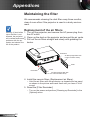
problems with the op- 3. Pull out the air filters straight and slowly with grabbing the
knobs.
eration and shorten the
life of the product.
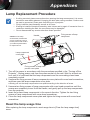
Protrusion
Air filter (longer filter with
5 rows of intake vents)
Knob
Protrusion
Knob
Air filter (shorter filter with
3 rows of intake vents)
4. Install the new air filters (Replacement air filters).
• Hold the air filters with the protrusion up towards the top panel
as shown in the picture and insert them until you hear a “click”
sound.
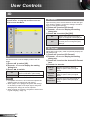
5. Reset the [Filter Reminder].
• Turn on the power and perform [Cleaning up Reminder] in the
[Options] menu.
English
50