1
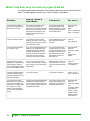
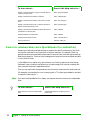
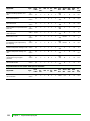
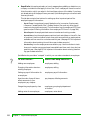
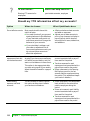
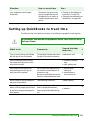
Situation
How to record in
QuickBooks
Comments
For more...
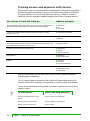
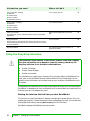
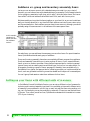
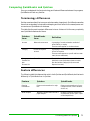
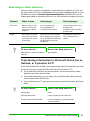
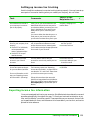
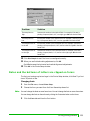
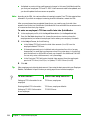
You want to see reports for a
particular group of customers, jobs, or vendors.
Examples: residential vs.
commercial customers;
remodeling jobs vs. new construction; vendors that sell
materials vs. subcontractors
When setting up a customer, job, or
vendor, assign a type. (Job types
are available only in QuickBooks
Pro and better.)
You can filter a relevant
report to limit the transactions to those for customers,
job, or vendors of the type
(or types) you specify.
You can filter a report of your
Customer:Job list or Vendor
list to limit the names to
those for the type (or types)
you specify.
search the Help
index for:
customer types
job types
vendors, adding
report customization
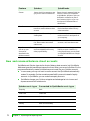
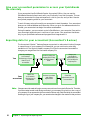
On your Item list, you want to
group similar items together.
Example: A school store
wants to group clothing items
and also group book items
Set up a main, or parent, item (for
example, clothing). Then set up
subitems of the parent item (for
example, T-shirt, cap). Use the
appropriate subitem when entering a sale or purchase of items.
On reports that summarize
amounts by item, QuickBooks provides an amount
for each subitem, and then a
subtotal for all subitems of
the same item.
search the Help
index for:
subtotals, on sales
forms
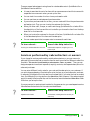
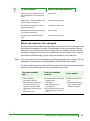
You want to track information
that QuickBooks doesn’t
already track for customers,
vendors, employees, or the
items you sell. Examples:
patient’s insurance company,
item size or colour
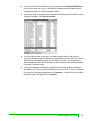
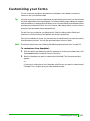
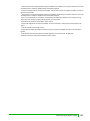
Set up a custom field for tracking
the particular kind of information.
Fill in the custom field, where relevant, for new and existing customers, vendors, employees, or items.
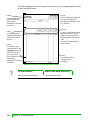
To display and print the custom
field on sales forms or purchase
orders, customize the form to add
the new field.
You can use the same custom field for customers, vendors, and employees if you
choose. Custom fields for
items are only for items you
sell or purchase (services,
parts, and other charges).
You can filter a relevant
report to limit the transactions to forms that have specific text in a custom field.
search the Help
index for:
custom fields, about
estimates, customizing
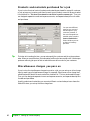
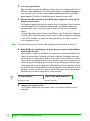
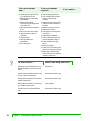
On your profit and loss statement, you want to see subtotals for accounts that have
something in common.
Example: A construction
company wants a subtotal for
construction income for
labour, materials, and subcontractors
Set up a main, or parent, account
for the subtotal (for example, construction income). Then set up subaccounts of the parent account (for
example, labour, materials, subcontractors). Use the appropriate subaccount when QuickBooks requires
you to specify an account.
On reports that summarize
amounts by account, QuickBooks provides an amount
for each subaccount and
then a subtotal for all subaccounts of the same account.
search the Help
index for:
subaccounts, then
click the link “Why
use subaccounts?”
Decisions to make before you start
11