1
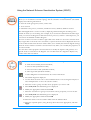
Creating a Node Type
Nodes contain the trunk groups that carry calls along the network. You can define different types
of nodes, and view the types in the Node Type table. You can also view the number of nodes of
each type that are connected to carriers.
1. Select File|Network from the menu bar. The Network module is displayed.
2. Select Reference Table from the folder list. The Reference Table sub-folders are
displayed.
3. Select Node Type from the sub-folder list and click inside the displayed Node Type
table.
4. Select Edit|New. The New Node Type dialog box is displayed.
5. Complete the fields and click OK. The new node type appears in the Node Type table.
n
Create three node types
n
Edit the descriptions of all the node types
n
Delete two of the node types
Now complete the following exercise:
Creating a Completion Group
Defining your Network
Interconnect: Business Course
18