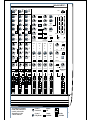
1
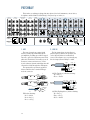
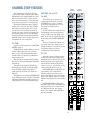
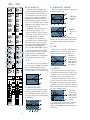
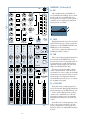
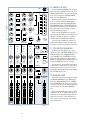
60. SUBGROUP FADERS
64. AUX LED
These faders provide 10dB of gain fully up,
unity gain at the “U” label and are effectively
muted fully down. Each fader is the master
level control for a subgroup’s signal, affecting
both the SUB OUTS (8) and the main mix, via
L/R ASSIGN (59).
Along with the RUDE SOLO LIGHT (61),
this LED blinks when any aux send master
SOLO (47) or the global aux return SOLO (52)
is engaged.
SOLO: (61 through 65)
61. RUDE SOLO LIGHT
Engaging any SOLO switch (39),(47),(52)
or (57) has this result: The CONTROL ROOM
OUT (11), PHONES (18) and METERS (54),
which ordinarily receive the main mix signals,
will instead receive the solo signal. The MAIN
OUTS (12) (16) and MONO MAIN OUT (14)
are not affected by a solo condition.
65. SUB LED
Along with the RUDE SOLO LIGHT (61),
this LED blinks when any subgroup SOLO (57)
is engaged.
TALKBACK: (66 through 68)
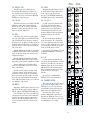
66. LEVEL
Having entered through the TALKBACK
MIC (17) jacks, talkback level is controlled by
this knob, and then sent to the MAIN MIX (67)
and AUX 1-2 (68) switches. It can be set as desired by the engineer.
Additionally, an LED associated with the
solo switch and the RUDE SOLO LIGHT will
blink obnoxiously.
67. MAIN MIX
The solo signal will be mono in PFL or stereo in AFL, as determined via the MODE (63)
switch. Any number of solo switches may be simultaneously engaged.
Engaging this switch sends the talkback signal to the main mix, allowing the user to speak
to the audience (live sound), or to slate a
song’s start (studio recording).
62. LEVEL
To prevent the possibility of feedback, engaging this switch will attenuate control room
output levels by 20dB.
This is the master level control for all solo
signals, regardless of MODE (63). It can be set
as desired, as it only affects the CONTROL
ROOM OUT (11) and PHONES (18). It does
not affect the solo levels sent to the METERS
(54).
63. MODE
With this switch down, solo signals are PFL
(pre-fader listen). With this switch up, solo signals are AFL (after-fader listen).
68. AUX 1-2
Engaging this switch sends the talkback signal to aux sends 1 and 2, allowing the user to
speak to the talent, providing that they are using those aux sends for monitoring.
To prevent the possibility of feedback, engaging this switch will attenuate control room
output levels by 20dB.
In PFL mode, the solo signal is tapped before a circuit’s associated level control (except
aux return SOLO (52)). PFL is popular for live
sound applications; providing quick inspections of individual or multiple channels, even if
their level controls are turned fully down.
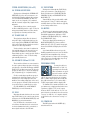
69. TAPE RETURN TO PHONES/C-R
Note: In PFL mode, when engaging a solo
switch whose associated level control is set
well below “U” (unity gain), turn down solo
LEVEL (62) to compensate for the difference.
It’s typically used for studio recording, to
patch a mixdown deck’s outputs directly to the
control room and phones; thereby always listening to the mixdown deck, whether it’s in
playback or input mode.
In AFL mode, the solo signal is tapped after
a circuit’s associated controls (trim, EQ, pan,
fader, mute, etc.). It’s the equivalent of muting
all the other channels. AFL is popular for studio recording applications; providing the actual
outputs of individual or multiple channels.
Ordinarily, the main mix (or solo) stereo
signal is sent to the control room and phones.
Engaging this switch will replace that with stereo signal from the TAPE IN (6) jacks, via the
TAPE RETURN (53) level control.
25