1
Test #3: Add To Cart Object
The following Functional Test aims to demonstrate the ability of the HiConversion pixel linking to
a shopping cart object with the relevant data gathered during a visitor’s add-to-cart session.
The test can be done in many different browsers. The following is the example of a test done in
the Google Chrome browser.
Google Chrome
Description:
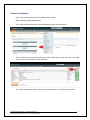
Use Google Chrome and its built-in “Inspect Element” tool.
Follow the
simple steps:
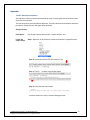
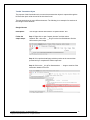
Step 1: Right click to open “Inspect element” and then select
‘Network’ tab – then enter ‘__hic.gif’ into the form field below to find the
HiConversion pixel image
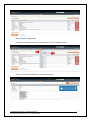
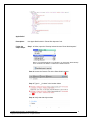
Step 2: Visit a product detail page, add product to the cart; as you reach
your checkout page __hic.gif image will appear in the list as shown below
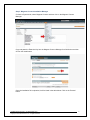
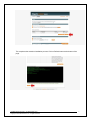
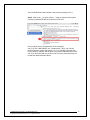
Step 3: Click on the __hic.gif?e=load& …. image to examine if the quantity
and price information is correct.
In the example above cart: {"tt":399.99,"qt":1} indicates the total value of the
UserManual-Web Analytics + CX Optimization.docx
Copyright © 2015 HiConversion, Inc. All rights reserved.
15