1
O pe r a tio n - E xter na l St orag e
1 1 E x t er n al Sto ra g e
The HDX is not only able to replay material ripped and stored on its internal hard disk but
will also enable playback of material stored on a variety of externally connected storage
hardware. Such hardware might be relatively small capacity units temporarily connected
via one of the HDX’s USB interface sockets, or large capacity disk drives connected via a
home network.
11.1 Network D e v ic e s
Before material stored on a network device can be
accessed by the HDX, it must scan the network to identify
the address of each device and to build a database of
the locations and details of the available audio files.
The HDX automatically scans the network when first
switched on and will then periodically scan to find
new storage hardware and identify any changes to
the available audio files. It may however take up to 45
minutes following connection of the HDX to the network for
changes to be reflected in the HDX’s database.
Note: Network scanning is carried out at up to several
hundred files per minute although this figure depends on
the speed of the file storage device.
The tracks found by the HDX on network storage will be
incorporated into its database and remembered until
any changes are identified, irrespective of the HDX being
switched off.
In order for network stored music to be available to the
HDX, for network or local playback various conditions must
be met:
•
Folders containing audio files must be set up to
be “shared”. Refer to the folder’s host computer
operating system user manual for details on setting
up shared folders.
•
Music files must be in AAC, FLAC, MP3, or WAV
formats (up to 24 bit, 96kHz only) for local playback,
or WAV and MP3 at 16 bit 44.1kHz for both local and
NaimNet network playback.
•
Music files must be unprotected by DRM encoding
that restricts them to specific playback hardware.
Note: Local connection is only intended for relatively small
music collections on temporarily connected memory sticks.
Any large capacity storage should always be connected
via the network.
In order for network stored music to be available to the
HDX, for network or local playback various conditions must
be met:
•
Music files must be in AAC, FLAC, MP3, or WAV
formats (up to 24 bit, 96kHz only) for local playback,
or WAV and MP3 at 16 bit 44.1kHz for both local and
NaimNet network playback.
•
Music files must be unprotected by DRM encoding
that restricts them to specific playback hardware.
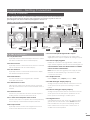
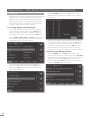
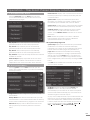
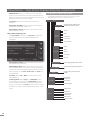
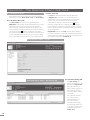
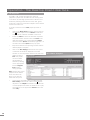
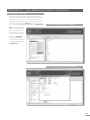
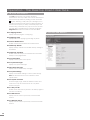
Diagram 11.3 illustrates how music files stored on both
locally and network connected hardware are displayed
on the left hand side of the Desktop Client Music Library
Tab. Selecting an item will expand the detail of its contents
in the right hand window.
Note: In Diagram 11.3, the locally connected external
storage device is a Freecom DataBar USB Device and the
network storage hardware is a PC hard disk containing two
shared music folders, “My Music” and “Party Music”.
1 1 . 3 Des k t op C l i en t Fi l e Di s p l a y
11.2 Local D e v ic e s
A locally connected storage device will most likely be a
memory stick connected to one of the HDX’s USB sockets.
Note: The amount of music stored on an external device
determines how long the HDX will spend scanning the
device when it is first connected before the music is
available to browse.
Note: Locally connected devices are re-scanned every
time the HDX starts up.
The tracks found by the HDX on locally connected storage
will only be held in its database while the storage is
connected and switched on.
E25