1
User’s Guide
Special keys
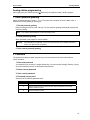
Line keys
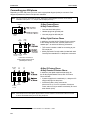
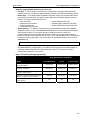
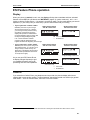
If some of your programmable feature keys have been programmed as line keys (or you can program
line keys using PROGRAM 2), press an unlit key to access the line. An outside call transferred to your
station can be answered by simply lifting the handset or pressing SPEAKER. You do not have to press
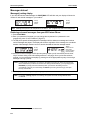
the line key. The LED indications for the line keys are:
LED
Solid red
Solid green
Blinking red
Line status
In use
Connected to your station
Ringing at another station
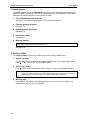
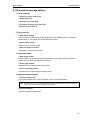
LED
Blinking green
Slowly blinking red
Slowly blinking green
Line status
Ringing at your station
On hold by another station
Held by you
Note: Dialing 9 (or 8 or 71–76) to be assigned a line automatically is always available.
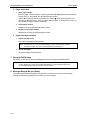
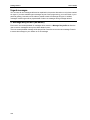
Privacy release
This feature makes it easy to “conference-in” on a call: just press a line key assigned to the outside line
1
the call is using, and you’ll automatically join the call.
Private line
If a private line has been assigned to your station, you must have a line key programmed (see pp. C.2–
C.3) in order to access it.
Optional features
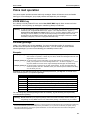
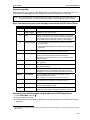
The following optional features may be accessible from your station. See the Administrator for details.
In many of the cases you can dial the appropriate feature code (one that starts with 5) to activate or use
the feature. In some instances, you must use a programmable feature key to serve as an on/off key for
the feature (see “Programmable feature keys,” page C.2).
Notes: In the codes below, XXX = ACD department number and YYY = extension number.
Codes tinted gray are the only codes that can be programmed on a 12-Key Feature Phone.
Code(s)
199
560
561
5XXX
562
563XXX
564
565
565YYY
566
567
568
Key usage
Overhead page
Manual day/night/holiday mode
Service observing
ACD agent log on/off
ACD agent wrap
ACD administrator
Headset operation
Call forward
Call fwd. to specific extension
Redial
Call-forward/no-answer
Message monitor key
Page
E.13
F.11
F.12
I.1
I.1
I.1
F.12
F.12
F.12
E.8
F.10
Code(s)
569
570
571
572
573
574
575, 576
577
578
579
580
Key usage
Background announce
Conference
Personal greeting 1
Personal greeting 2
Personal greeting 3
Missed-Call Key
Virtual Answer Keys
QuickPage
Mute/DND
Voice mail
Override ring
Page
F.13
F.13
F.13
F.13
F.13
F.14
F.14
F.9
(Continued)
1
This feature may not be available on your system, depending on how it has been programmed. If you wish to enable this feature
on your phone system, contact your System Administrator.
F.11