1
3 Installation
Important
Please make sure the installation surface can min support the 3X weight of the camera and the
bracket.
3.1
The dome camera usually mainly uses the in-ceiling installation. It can be installed on the ceiling or the
wall.
Step1
Draw and then dig three holes in the installation surface according to the dome pedestal positioning holes.
Please take out the expansion bolts in the accessories bag, and then insert three expansion bolts in the
holes. Secure these three bolts firmly.
Step 2
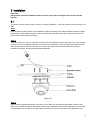
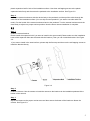
Take the device out, use your left hand to hold the device pedestal and then right hand to turn the external
enclosure to the corresponding position of the arrow in the pedestal. Use your right hand to push the both
sides of the external enclosure to remove the buckle and then pull the external enclosure from the
pedestal to make the enclosure and pedestal separated.
Figure 3-1
Step 3
Adjust the device pedestal position according to your cable exit requirements (top cable exit/side cable
exit), pull the cable through the side cable exit from the installation surface and the pedestal (You can skip
current operation if you want to use top cable exit mode). Line up the screw hole of the pedestal to the
4