1
User Manual
Server Edition Plug-ins for MS Windows
1 Plug-in Installer
The Plug-in Installer allows you to upgrade existing Server Edition (SE) Backup Clients with added
functionality by installing application specific plug-ins and other monitoring tools. You can also
upgrade existing plug-ins with this installer. As from SWISSVAULT v5.0, plug-ins can also be autoupdated during the backup process, if enabled on the StorageCenter. The Plug-in Installer is only
available for Windows systems.
The SWISSVAULT Server Edition Client must be installed on the computer before you can install any
plug-ins. SE Plug-ins requires working space for the cache and disk space for creating a data dump
and patches.
Note: Ensure that the drive where the Backup Client is installed has enough free hard drive
space to store an extra copy of all the selected files. If not, move the toBackup, Cache and
dump folder to another drive.
1.1 Installation and Configuration
The application does not have to be installed before updating the Backup Client. Simply run the Plugin Installer executable and supply the necessary information. The installer will prompt you to close the
SE Backup Client interface, if it is open, when running the Plug-in installer.
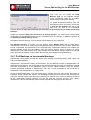
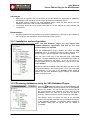
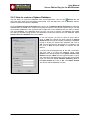
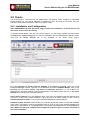
The Plug-in Installer displays a list of all the
available plug-ins that you can install. Plugins marked with
are already installed on
the system. Any plug-ins marked with a
blue icon will be upgraded to the latest
plug-in version.
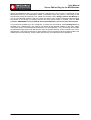
Version Information displays the Plug-in
Installer version information
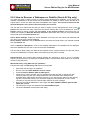
Select or deselect any of the plug-ins by
clicking in the checkbox next to the plug-in
name. After you have made all the
necessary changes, click on Next. The
next screen will display a summary of all
the changes that you have requested. Click
on Apply requested changes to continue
with the upgrade or Back if you want to
modify your selection.
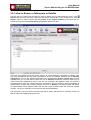
The Plug-in Installer stops the SWISSVAULT SE service, installs, upgrades or uninstalls the selected
plug-ins and starts the service again. Click on Finish to close the application. After installing the plugins, open the Backup Client and configure the installed plug-ins. For more information about the plugins, please refer to the next chapter.
Note: The Plug-in Installer does not remove the dump folder used by the plug-ins or any plugin specific settings when you remove plug-ins. You have to remove it manually if needed.
© 2008 by SWISSVAULT AG
Version 5
Page 3 of 37