1
170
Identifying an External File That Is in Your Default Directory
4
Chapter 7
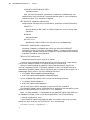
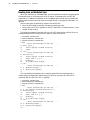
For example, you can use the following FILENAME statement to assign a fileref to
an OpenVMS text-library:
filename mytxtlib ’[mydir]mydata.tlb’;
Then, assuming that you want to use a library member named SCORES01, you can
use the following INFILE statement:
infile mytxtlib(scores01);
Note: The file-type rules for OpenVMS text library syntax differ from the rules for
directory-based aggregate syntax. When referring to a member of an OpenVMS text
library, do not specify a file type. If you do, the file type is ignored. For example, in the
following statements the fileref TEST refers to an OpenVMS text library:
filename test ’mylib.tlb’;
data _null_;
file test(one.dat);
put ’first’;
run;
The file type .DAT is ignored, and the FILE statement writes member ONE to the
text library, not to ONE.DAT. Wildcard characters are not allowed in filenames when
you are using OpenVMS text-library syntax. 4
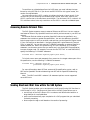
Identifying an External File That Is in Your Default Directory
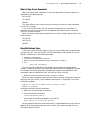
As explained in “Order of Precedence for External File Specifications” on page 166, if
an external file specification is a valid SAS name and is neither quoted nor a previously
defined fileref or OpenVMS logical name, then SAS opens a file by that name in your
default directory. Therefore, you cannot use the special characters # or @ in the external
file specification, because these characters are not valid in OpenVMS filenames.
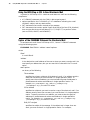
The specification must be a filename only; do not include the file type. The SAS
System uses a default file type depending on whether you are reading or writing data
lines or reading SAS statements, as indicated in “Default File Types” on page 171.
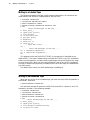
The following INFILE statement reads the data file FOOD.DAT from the default
directory (FOOD has not been defined as a SAS fileref nor as an OpenVMS logical
name):
infile food;
When SAS encounters this statement, it searches the default directory for a file named
FOOD.DAT. Records are read from FOOD.DAT according to subsequent INPUT
statement specifications.
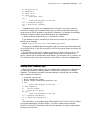
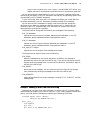
The following FILE statement writes data lines to the file PRICES.DAT in the
default directory (PRICES has not been defined as a SAS fileref nor as an OpenVMS
logical name):
file prices;
When SAS encounters this statement, it writes to a file named PRICES.DAT in the
default directory. Data lines are written to PRICES.DAT according to subsequent PUT
statement specifications.