1
Basic Skills
Enter Information on Your Toshiba Pocket PC
You have several options for entering new information:
■ Use the input panel to enter typed text, either by using the soft keyboard
or other input method
■ Write directly on the screen
■ Draw pictures on the screen
■ Speak into your device microphone to record a message
■ Use Microsoft® ActiveSync® to synchronize or copy information from
your computer to your device. For more information on ActiveSync, see
ActiveSync Help on your computer.
Entering Text Using the Input Panel
Use the input panel to enter information in any program on your device.
You can either type using the soft keyboard or write using Letter
Recognizer or Block Recognizer. In either case, the characters appear as
typed text on the screen.
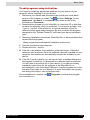
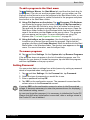
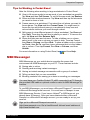
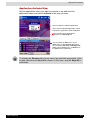
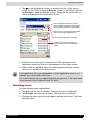
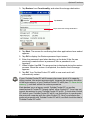
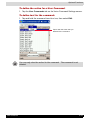
To show or hide the input panel, tap Input Panel. Tap the arrow next to the
Input Panel button to see your choices.
Select an input
method.
Tap to see your
choices.
Input panel button.
When you use the input panel, your device anticipates the word you are
typing or writing and displays it above the input panel. When you tap the
displayed word, it is inserted into your text at the insertion point. The more
you use your device, the more words it learns to anticipate.
To change word suggestion options, such as the number of words
suggested at one time, tap
, Settings, Personal tab, Input, and then
the Word Completion tab.
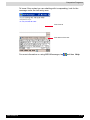
To type with the soft keyboard:
1. Tap the
arrow and then Keyboard.
2. On the soft keyboard that is displayed, tap the keys with your stylus.
To use larger keys, tap the
arrow, Options, select Keyboard in Input
method, and then select Large Keys.
User’s Manual
2-19