1
Anzio User Manual
6.10
File Transfer To Printer
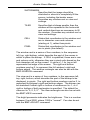
To send data from the host to the printer, using Kermit or similar transfer
protocols, specify the PC output file as “WPRN”. When Anzio sees this
special name, it will send the received data to its print handler.
Or, in the FTP/SFTP dialog, you can right-click a file and choose "Print".
6.11
Printing Files
With Anzio's command interface, it is possible to print files that exist on a
local disk, on a networked drive, or on an FTP, HTTP, or HTTPS server.
Just use the PRINTFILE command, or use the COPY command to copy
a file to "WPRN".
6.12
End-of-Print Flush Timer
When you print from Anzio, the output does not necessarily include page
feeds (paper eject).
Printer data is saved up in a print job, until the job is flushed (sent) to the
printer or print spooler.
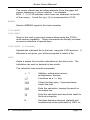
To finish printing a page or job, use File/Eject. See also the FLUSH and
EJECT commands.
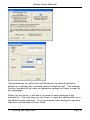
You can set a delay time to use between the last printed character and
an automatic eject. Use File/Flush Timer, or the FLUSHTIMER
command. The default FLUSH TIMER is 5 seconds. If something has
been sent to the printer, and 5 seconds go by without anything more
being sent to the printer, Anzio assumes you are done printing, and it
flushes the job. Five seconds after a screen print, or 5 seconds after
your last passthrough print data comes in, the data is printed on the
printer.
Note that the passthrough print protocol does not have a mechanism by
which the host can tell Anzio that it is finished with a print job. That is
why the FLUSH TIMER setting is critical. If passthrough print data
arrives sporadically from the host, with pauses, you may need to
increase the FLUSH TIMER, to prevent Anzio from breaking the one
6
Printing
Page 80