1
electrolux 5
Control panel
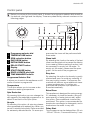
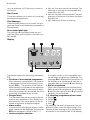
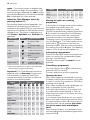
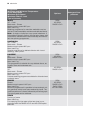
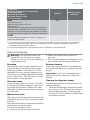
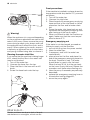
Below is a picture of the control panel. It shows the programme selector dial as well as
the buttons, pilot light and the display. These are presented by relevant numbers on the
following pages.
1
1
2
3
4
5
6
7
8
9
10
2
Programme selector dial
TEMPERATURE button
SPIN reduction button
EASY IRON button
EXTRA RINSE button
DELAY START button
Display
START/PAUSE button
DOOR LOCKED pilot light
TIME MANAGER buttons
Programme Selector Dial
It allows you to switch the appliance on/off
and/or to select a programme.
Temperature
This button allows you to increase or decrease the washing temperature.
Spin Reduction
By pressing this button you can change the
spin speed of the selected programme or to
select Rinse Hold or No Spin option.
No spin
By selecting this option, all spinning phases
are suppressed and replaced by a drain, so
as not to wrinkle the laundry. Recommended
for extremely delicate fabrics. On some pro-
3
4
5
6
7
8
9 10
grammes the rinses will be performed with
more water.
Rinse hold
By selecting this function the water of the last
rinse is not emptied out to prevent the fabrics
from creasing. Before opening the door it will
be necessary to empty out the water. To
empty out the water, please read the paragraph «At the end of the programme».
Easy Iron
By selecting this option the laundry is gently
washed and spun to avoid any creasing. In
this way ironing is easier. Furthermore the
machine will perform some additional rinses
in some programmes. On cotton programmes the maximum spin speed is reduced automatically.
Extra Rinse
This appliance is designed for saving energy.
If it necessary to rinse the laundry using an
extra quantity of water (extra rinse), select
this option. Some additional rinses will be
performed. This option is recommended for
people who are allergic to detergents, and in
areas where the water is very soft.
Delay Start
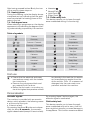
The programme can be delayed from 30 min
- 60 min - 90 min, 2 hours and then by 1 hour