1
Installation and Getting Started
CHAPTER 2
2.1
Installation
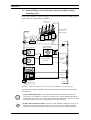
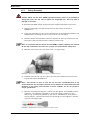
The instructions provided below are provided for installation of the Switchos™ II
Advanced Microcolumn Switching Unit as part of the LC Packings UltiMate™
Capillary HPLC System as well as for installation of the instrument as a standalone component in an HPLC system.
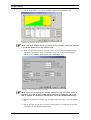
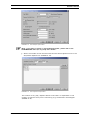
When the Switchos Advanced Microcolumn Switching Unit is used in conjunction
with the UltiMate system and the FAMOS™ Microautosampler, all instruments
are controlled by the CHROMELEON® software. The loading pump will be
included in the instrument network and the switching valves will be controlled by
a COM port of the PC.
If no additional COM port is available or if the Switchos is to be installed with
different or third-vendor software, please refer to Sections 2.4 and 2.5 for
information about how to control the switching valves by relay outputs. (e.g. the
Event outputs of the Switchos loading pump or the Auxiliaries of the FAMOS
Microautosampler, if present).
Once you have set up the Switchos, refer to Section 2.7 for information about
routine operation of the system.
Please refer to the user’s manuals of the UltiMate system and the FAMOS
Microautosampler and the online help of CHROMELEON for additional
information.
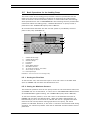
2.1.1 Location of Switchos in the Laboratory
The Switchos Advanced Microcolumn Switching Unit should be installed in a
facility with the following environmental conditions:
•
The temperature range should be maintained between 10 and 40oC. The
system should be installed in an area in which the temperature is fairly
constant (do not place the system near a window, an air conditioning duct or
a heating duct). The humidity should be maintained between 20 and 80 %
relative humidity.
User’s Manual Switchos
D850R3
2-1