1
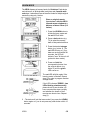
STEP 1 : PRESS TV BUTTON
STEP 2 : PRESS POWER BUTTON
STEP 3 : PRESS TV/VIDEO BUTTON
STEP 4 : PRESS LD BUTTON
STEP 5 : PRESS POWER BUTTON
STEP 6 : PRESS OPEN BUTTON
STEP 7 : PRESS AV BUTTON
STEP 8 : PRESS POWER BUTTON & HOLD
(holding time = delay time)
STEP 9 : PRESS AUDIO MODE BUTTON
Press the learn button or wait 15 seconds until the remote goes
back to normal. The red LED no longer blinks.
PROGRAMMING MACRO WITH A MULTI-CODE KEY
It is possible to use a special multi-code key to program a macro
(e.g. select the fourth function of button S1). Press the ’S’-button
4 times in rapid succession and then perform the next step.
OPERATING THE REMOTE CONTROL
NORMAL OPERATION
(1) Select a device button
(2) Press the desired storage button, the red LED will flash
once. The LED will not flash if no data have been stored yet.
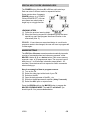
OPERATION OF THE SPECIAL MULTI-CODE KEY
(1) Select a device button
(2) Press the special multi-code button once to transmit the
1st memory function.
(3) Press again to transmit the 2nd.
(4) Repeated pressing will scroll through and transmit the
following memorised functions (max. 5)
MACRO OPERATION
(1) Press the MACRO button. You then have 2 seconds to enter
the desired macro number (0 - 9) or press the device button
in question.
IMPORTANT : When MACRO is pressed, the user should place
the unit in the proper location, i.e. with the infrared window facing
the selected A/V systems.
VRC8
7
GB