1
(HTT06681172)
BT1212 User Manual
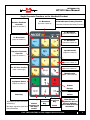
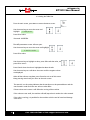
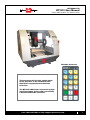
Single Keystroke Functions on the Handheld Pendant
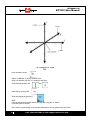
Y+ Movement
(Input the number 8)
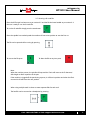
Positive Feedrate
Override
(Input the number 7)
Bold Indicates Primary Function
(Parenthesis Indicates Secondary Function)
Z+ Movement
(Input the number 9)
X- Movement
(Input the number 4)
X+ Movement
(Input the number 6)
Spindle On/Off
(Input the number 5)
Negative Feedrate
Override
(Input the number 1)
Z- Movement
(Input the number 3)
Y- Movement
(Input the number 2)
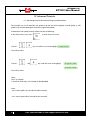
Set XY Zero Position
(Input a minus sign)
Menu Screen
(Input a decimal point)
Jog Speed Select
(Input the number 0)
Stop
Cancel
Escape
OK
Start key
Yellow Keys represent movement
related keys
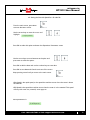
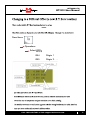
Select
Shift Key
Switch
between Jog
Blue Keys represent speed and
and Step
feed related keys
modes
Up
Down
Directional
Directional
Key
Key
Pause
Enter Manual
Parameters Screen
Change high/low
speed and XYZ step
increment
Call: 1-631-648-7481 or Visit: support.technocnc.com
5