1
SETTING UP YOUR SYSTEM
IMPORTANT: Before connecting any peripheral to your computer, always disconnect
the power supply first. Failure to do so could damage your computer.
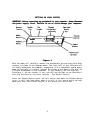
Figure 1
With the power off, carefully connect the peripherals you are using into their
sockets, as shown in the diagram above. The front half of your Disciple will
fit neatly underneath the computer, supporting it at a convenient typing angle.
When the Disciple is in place, tighten the screws at the base of the unit for
a secure attachment to the computer. If you normally use the Sinclair
Interface 1, do not connect it yet; you will be told how to use Interface 1
with the Disciple in the later section - The Inhibit Button.
Press the Inhibit Button twice. You will notice that when the Inhibit Button
is on, it will lock into place; when it is off, it will spring out of the lock.
Make sure that the Inhibit Button is off before you start work.
5