1
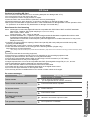
Viewing from SD Card
(VIERA IMAGE VIEWER)
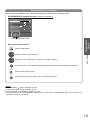
Photo View: Still images recorded by digital cameras will be displayed.
Movie View: Moving pictures recorded by digital video cameras will be played back.
●During the operation, no signals are output from any of the AV terminals. But the sound in Movie View can be
output from AUDIO OUT and DIGITAL AUDIO OUT terminals.
●“Date” shows the date on which the recording was made by the digital camera or digital video camera. The file
without record of the date is shown “**/**/****”.
p. 47
●For details on SD Cards
To insert SD Card
To remove SD Card
Label
surface
Push until
a click is
heard
●Blue LED lights while SD
Blue LED
Card is inserted if “SD
Card LED” is set to “On”
in the Setup Menu (p. 25).
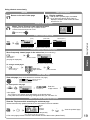
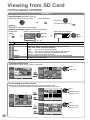
Photo View
1
2
Insert the SD Card
Select “Photo View”
access
SD Card
Photo View
POWER
INPUT
TV
OFF TIMER
ASPECT MENU
EXIT
select
Movie View
AV
3
Select a folder to display the thumbnail
select
Photo View Mode
Folder view
1/23
Folder name
100_PANA
Number of pictures
38 pictures
101_PANA
3 pictures
102_PANA
14 pictures
200_PANA
20 pictures
201_PANA
7 pictures
ROOM
1 picture
Fruit
18 pictures
Nature
14 pictures
thumbnail
RETURN
Select
R
G
Y
B
EXIT
Select
RETURN
TEXT
STTL INDEX HOLD
●To display all the photos p. 36
(Folder view)
Select a photo from the thumbnail to be viewed
All pictures
4
Selected
photo
Error display
(images that could not be loaded, etc.)
Photo View Mode
Folder view
100_PANA
MUTE
SURROUND
1/38
File name
p1010001
Date
23/10/2008
Pixel
1600 x 1200
Select
To return to TV
p1010001
p1010002
p1010003
p1010004
p1010005
p1010006
p1010007
p1010008
p1010009
p1010010
p1010011
p1010012
or
select
single view
EXIT
Select
RETURN
View
Slideshow
EXIT
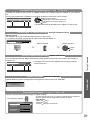
●The files which are not in a folder will be
collected to the folder named “/”.
View
Advanced
OPTION
100_PANA
38 pictures
HDMI Functions
Viewing from SD Card (VIERA IMAGE VIEWER)
Press the
centre of
the card
Sort by Month
Selected photo
information is displayed
Sort by Date
(Thumbnail)
To return to the
previous screen
●Slideshow p. 36
●To sort by date or month recorded
p. 36
Displayed one at a time
●To display / hide the operation guide
RETURN
Single view
Rotate
EXIT
Select
List
To the previous photo
Rotate 90˚ (counter-clockwise)
Rotate
To the next photo
Slideshow
Operation guide
(Single view)
Rotate 90˚ (clockwise)
●To return to thumbnail
RETURN
35