1
Operation
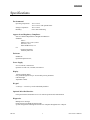
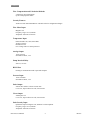
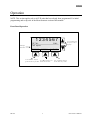
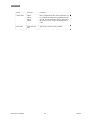
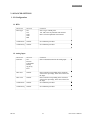
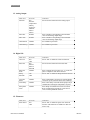
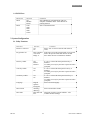
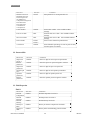
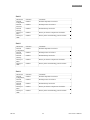
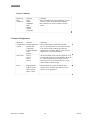
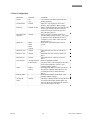
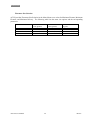
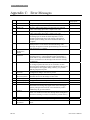
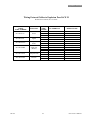
Display parameters
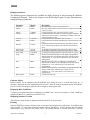
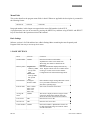
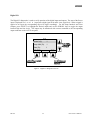
The following process parameters are available for display and may be selected using the Windows
Configuration Program. Refer to the chapter on the WinConfig Program for more information on
setting the display parameters.
Parameter
Display
Frequency
V/Rate
FREQ
RATE
U/Rate
V/Total
U/RATE
TOTAL
U/Total
M/Rate
U/TOTAL
RATE
M/Total
TOTAL
M/Acc Total
V/Acc Total
U/Acc Total
Temp
ACTOT
ACTOT
U/ACTOT
TEMP
Press
PRES
Dens
DENS
Date and time
DATE
Description
Measured input frequency from turbine meter.
Flow rate, compensated to a selected reference condition, expressed
in units of volume.
Uncompensated flow rate, expressed in units of volume.
Compensated total, corrected to a selected reference condition,
expressed in units of volume. ACEII always defaults to the total
selected in Delivery Units.
Uncompensated total, expressed in units of volume.
Compensated flow rate based on fluid density, expressed in units of
mass.
Compensated total based on fluid density, expressed in units of
mass. ACEII always defaults to the total selected in Delivery
Units.
Accumulated compensated total expressed in units of mass.
Accumulated compensated total expressed in units of volume.
Accumulated uncompensated total, expressed in units of volume.
Measured flowing temperature. It will display a programmed
default temperature when default temperature is being used for
compensation, or “N/A” when temperature is not selected for
compensation.
Measured flowing pressure. It will display a programmed
default pressure whenever the default pressure is being used for
calculation, or “N/A” when pressure is not selected for
compensation.
Measured flowing density. It will display a programmed default
density whenever the default density is being used for
calculation, or “N/A” when density is not selected for
compensation.
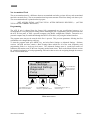
Current Date and Time
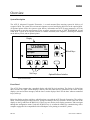
Contrast Adjust
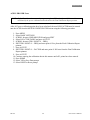
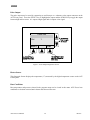
Display contrast can be adjusted using the SCROLL keys during the first 15 seconds after power up. A
message is displayed while the adjustment period is active. After the contrast adjustment period, the SCROLL
keys are used to select display parameters or to navigate in the program menu.
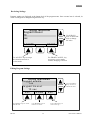
Displaying Base Conditions
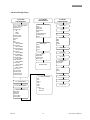
To display current Base/Reference Conditions press MENU key, scroll to item number 5 (Base Conditions)
using the SCROLL key, and then press SELECT key.
Displaying Software Version
The software version number is displayed each time the ACE II is powered up.
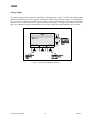
Printing
Press the PRINT key to print a delivery ticket. A message will be displayed to ready printer. Press OK to print
delivery ticket. To select other items for printing press the MORE key. Select a desired item for printing
using SCROLL keys, and press the SELECT key. The printing function is available while flow is present.
ACE II User’s Manual
8
HP-307