1
ModelMaker version 6.20
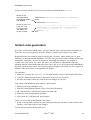
To insert a shape node into an association, press the Ctrl-key and drag on a line segment of an
association. After the mouse is released, a new node is inserted. Alternatively, use Insert
Shape Node from the diagram editor “Association” popup sub menu. This command is
available if you invoke the popup menu on an association.
Shape nodes can be moved by selecting the association and then drag them with the mouse.
A shape node can be deleted by aligning it with the two surrounding nodes and is basically the
reverse of creating a new shape node. Alternatively, use Delete Shape Node from the diagram
editor “Association” popup sub menu. This command is available if you invoke the popup
menu on a shape node. The command ‘Clear shape nodes” in the same popup menu will clear
all shape nodes in all selected associations.
Recurrent associations
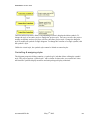
Normally associations connect two different symbols. If both ends of an association are
connected to the same symbol, the association is recurrent. Most associations can be made
recurrent. Some recurrent associations will display a rounded curve rather than a square path.
The rounded curve is a bezier that is controlled by two shape nodes. Inserting another shape
node will turn the bezier curve into normal straight lines.
usermanual620.doc
May 7th 2002
82