1
System Operation and Thermal Optimization
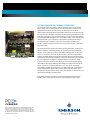
The Dell R720 system fans produce direct air within the system to cool the PCI
Express cards. There is a black plastic shroud that channels the air from six hot
swappable fans (Photo 4). This also ensures air flows across the rest of the
motherboard components and through the PCIe section once it has gone through
the CPU heatsinks. We highly recommend monitoring both the PCIE-8120 air inlet
and outlet temperatures. This can be done using the “read-sensors” tool provided
with the Emerson BBS package. If either temperature sensor reports a temperature
of higher than 60 °C, you may want to check whether anything mechanically is
disrupting the system air flow or your system environment conditions have
changed. If neither situation has occurred, then you should consider adjusting the
system fan profile.
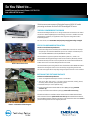
Photo 4. Hot Swappable Fans
The Dell R720 has three system fan profiles (high fan speed offset, low fan speed
offset, maximum air exhaust temperature 50 °C) which control the system fans’
behavior. These profiles can be found under iDRAC Settings under the “thermal”
section. In data center environments (20 °C ambient), the low fan speed offset
profile is the default setting and Emerson testing indicates the PCIE-8120 should
operate properly under these conditions. During normal operation, you can expect
the card temperature readings to be anywhere between 30 and 55 °C. If any
temperature reading should go above 60 °C, you should use the high fan speed
offset profile and/or apply additional CPU loading to increase fan speeds. Do not
use the “maximum air exhaust temperature 50 °C” setting, this is currently
incompatible with PCIE-8120. Please ensure air flow is such that card temperature
sensors reading do not go above 80 °C as these high temperatures may cause
damage to the board and will certainly result in lower lifespan. In extreme cases, the
board will shut itself off to prevent damage.
If you should run into any questions or issues with the PCIE-8120 with the HP
DL380p, please contact your local Emerson Field Application Engineer (FAE).
Emerson, Business-Critical Continuity and Emerson Network Power are
trademarks of Emerson Electric Co. or one of its affiliated companies.
Intel and Xeon are trademarks of Intel Corporation in the U.S. and/or other
countries. PCI Express (PCIe) is a registered trademark of PCI-SIG. D
ell
and the DELL logo are trademarks of Dell Inc. © 2013 Emerson Electric Co.
PCIE8120DELL-AP0 3-2013