1
A Guide to GyroTrac
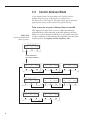
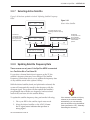
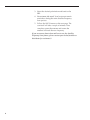
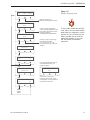
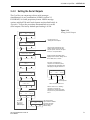
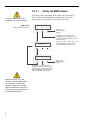
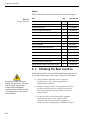
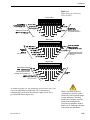
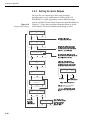
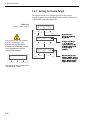
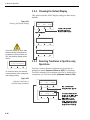
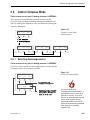
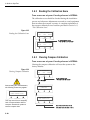
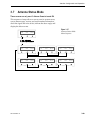
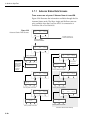
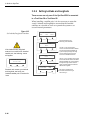
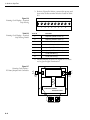
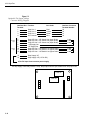
3.4.2 Setting the Serial Outputs
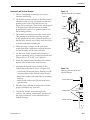
The GyroTrac can output up to three serial messages
simultaneously in any combination of NMEA version 2.2,
KVH RS-422, or Cetrek proprietary format. NMEA message
options and the KVH and Cetrek formats are described briefly in
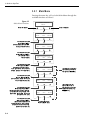
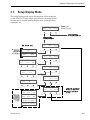
Appendix C. Follow the procedures illustrated below to set the
serial outputs. The factory default speed setting is 10 Hz.
Figure 3-14
Setting Serial Outputs
Set serial outputs?
Yes
Next
Return
Proceed to Sec. 3.4.3
"Setting the Furuno Output"
Select serial port 1
Yes
Next
Cancel
Opens menus for Serial Ports 2 & 3.
All three serial ports have the same
selection options. However, the output
from Port 1 is only 4800 baud.
Serial port 1 config
Output Data: NMEA
Serial Port setting information will be
displayed for 2.5 seconds. Setting can be:
None, NMEA, KVH, or Cetrek
-
Set speed: 10 Hz
Enter
+
If GyroTrac is configured as a
component of a TracVision system,
the following screen will appear when
attempting to configure Serial Port 3:
Resetting outputs?
Yes
No
No Port 3. TV setup
Yes
Next
Cancel
No Action
Return to
"Set Serial Outputs?"
**
Outputs erasing
Please Wait
**
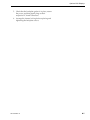
Return to "Select Serial Port 1"
Section 3.5.5, "Selecting
TracVision or GyroTrac-only
Operations" to configure the system
Refer to
as GyroTrac-only and activate Serial
Select output type
NMEA
KVH
Cetrek
Proceed to
Sec. 3.4.2.1
Port 3.
This screen will only
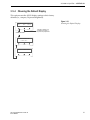
Cetrek data is: Mag
Mag
ENTER
True
appear if GPS is available
"Setting the
to provide True North
NMEA Outputs"
Data, otherwise the
default is "Mag."
3-10