1
Programming the Software
•
Wave-Maker
•
Filter
•
Pager (optional)
•
Conductivity
•
Digital Input
arrow key until you reach pH
Setpoint. Then press Enter.
•
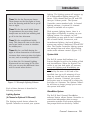
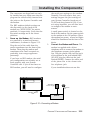
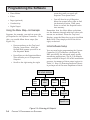
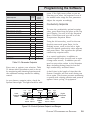
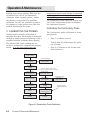
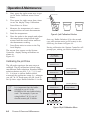
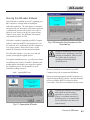
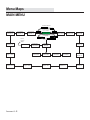
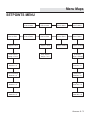
Using the Menu Map—An Example
Suppose, for example, you wish to enter the
pH setpoint for the System Controller . To do
this, you would follow these steps (See
Figure 3.4):
•
From anywhere on the Top Level
Display, press Enter . After the
System hold prompt you will be at
the Setpoints Menu.
•
Press Enter at the Setpoints Menu.
This will take you to Temperature
Setpoint.
•
Scroll to the right using the right
You will then be at pH Setpoint.
Move the arrows left or right to find
the desired pH value. Then press
Enter to record the Setpoint value
into memory.
Remember that the Main Menu selections
are the doorway through which all other submenus are accessed. From the Top Level
Display, press the Enter key to get to the Main
Menu level. Then simply scroll to the left or
right, as desired.
Initial Software Setup
You can now begin programming the System
Controller H2O/S software—developed by
RK2 specifically for advanced water quality
monitoring applications. The H2O/S software
setup consists of Steps 9-23 in the installation
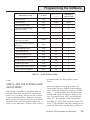
process. A summary of these steps is given in
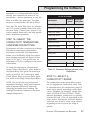
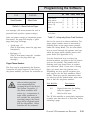
Table 3.1. Step 15 (Entering Setpoint Values)
is perhaps one of the most important of these
TOP LEVEL DISPLAY
Cond.
Setpoint
Exit
Main
Menu
Setpoint
Menu
Operation
Menu
Setup
Menu
Exit
Setpoints
Temp
Setpoint
ORP
Setpoint
pH
Setpoint
pH Setpoint
Setpoint=x.xx
3-4
Figure 3.4 • Entering pH Setpoint
CHAPTER 3: PROGRAMMING THE SOFTWARE