1
4.1.2. Setting-up keypad buttons ADDRESS
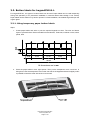
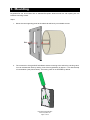
1. Push the keypad button addressing switch on the rear side of keypadCUE-8 by small
screwdriver or wire; backlight LEDs are switched off to indicate Set Address Mode.
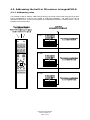
2. Button LEDs indicate ADDRESS in binary code – Button 1 bit 0, Button 2 bit 1 etc… Push
buttons to toggle address bits to the requested value of ADDRESS (see examples in the
picture below).
3. Push keypad button addressing switch to save ADDRESS to non-volatile memory and to enter
keyboard Standard Mode - backlight LEDs are switched on to indicate Standard Mode.
Bit 0 (20=1)
Bit 4 (24=16)
Bit 1 (21=2)
Bit 5 (25=32)
Bit 2 (22=4)
Bit 6 (26=64)
ADDRESS: 0
Bit 3 (23=8)
ADDRESS: 1
ADDRESS: 2
ADDRESS: 3
ADDRESS: 9
Bit 7 (27=128)
4.1.3. Troubleshooting
Flashing backlight LEDs indicate non-volatile memory ERROR. Try the Power OFF – Power ON
sequence to restart the device and set ADDRESS again.
User Manual keypadCUE-8
www.cuesystem.com
Page 11 of 20