1
6
Testing the Network Adapter
Diagnostics Program
The network adapter can be tested with the supplied diagnostics program (running on DOS).
During testing the link of the tested port will be down, i.e. no data can be transferred.
i
During testing, observe the safety precautions given in chapter “Safety Precautions”.
If the fiber adapter is not connected immediately to the data network, insert the protective plug
for safety reasons (otherwise laser light may be emitted) and as a protection against dust and
dirt.
The following tests are available:
•
•
i
Simple test without loopback:
This test covers all components but not the port (socket including components for transmitting / receiving the data signals).
Comprehensive port test with loopback:
All components are tested, including the port.
The tests do not run in a Windows DOS box.
Loopback Wrap Plug Test
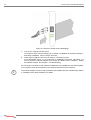
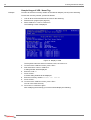
To perform the loopback wrap plug test, you will need a wrap plug (see figure 6 “Setup for
loopback wrap plug testing”).
Alternatively, the loopback test can be performed from port to port (for dual adapters only) or
via external repeater. Loopback testing via external repeater requires another adapter installed in a second computer running in repeater mode (also see section “Loopback Repeater
Test”). The following procedure describes the test via wrap plug.
Figure 6. Setup for loopback wrap plug testing
SysKonnect SK-9Exx/9Sxx Gigabit Ethernet Server Adapters