Transcript
MCMGBSC055/MCMGBSC055GB/
MCMGBSC055EU
Gigabit Ethernet Multi-Mode Fiber Media
Installation
Converter - SC 0.55 km
1.Connect the Ethernet cable to the Fiber Media
Converter RJ45 Ethernet port.
Installation Guide
2.Connect the other end of the Ethernet cable to the
router/switch/computer NIC.
Packaging Contents
• 1 x MCMGBSC055 / GB / EU media converter
• 1 x Power Adapter
• 1 x Installation Guide
• Gigabit (1000Mb/s) Ethernet network
• Gigabit (1000Mb/s) Fiber network
FX
LINK
LINK
TP
RX
NOTE: Normally the Mode switch should be set for AUTO,
but if connecting to another media converter, FORCE may
need to be set.
Specifications
LED Indicators
PWR
4.Plug the provided power adapter into the media
converter, and into an available AC power outlet.
5.Connect the other end of the fiber cable into the
router/switch/computer NIC/another media converter.
Remember to reverse the TX and RX leads between the
two devices.
System Requirements
LED
3.Connect the fiber cable into the fiber receptacle on the
media converter.
Status
Description
Connectors
1 x RJ45 Ethernet
2 x SC Fiber
1 x Power connector
ON
Power On
OFF
Power Off
LEDs
Power, Fiber Link, Fiber Receive, Ethernet Link
ON
Fiber Link Detected
Fiber Type
Multi Mode 62.5 or 50/125 micron fiber
OFF
No Fiber Link Detected
Maximum Distance
550m (50/125) or 220m (62.5/125)
ON
Ethernet Link Detected
Transmission Standards
IEEE802.3ab, 802.3z
OFF
No Ethernet Link Detected
Duplex Mode
Full/Half (Auto-Detect)
ON
Unit is receiving data from Ethernet port
Dimensions
99.0mm x 73.0mm x 27.0mm
OFF
No incoming data from Ethernet port
Weight
450g
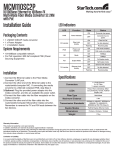
Rear View
Front View
SC Fiber port
RJ45 Ethernet port
LED
indicators
DC power port
Mode switch
Warranty Information
This product is backed by a one year warranty.
In addition, StarTech.com warrants its products against defects in materials
and workmanship for the periods noted, following the initial date of purchase. During this period, the products may be returned for repair, or replacement with
equivalent products at our discretion. The warranty covers parts and labor costs only. StarTech.com does not warrant its products from defects or damages arising
from misuse, abuse, alteration, or normal wear and tear.
Limitation of Liability
In no event shall the liability of StarTech.com Ltd. and StarTech.com USA LLP (or their officers, directors, employees or agents) for any damages (whether direct
or indirect, special, punitive, incidental, consequential, or otherwise), loss of profits, loss of business, or any pecuniary loss, arising out of or related to the use of
the product exceed the actual price paid for the product. Some states do not allow the exclusion or limitation of incidental or consequential damages. If such laws
apply, the limitations or exclusions contained in this statement may not apply to you.