1
Message Folders
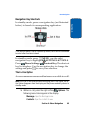
3. Press
OPEN to view contents of the highlighted
message.
4. While viewing a message press the right soft key
Options to display the options listed.
• Play Again: Replays a PIX message.
• Forward: Forward the message to another recipient.
• Reply With Copy: Allows you to reply with a copy of
previous message attached.
• Save PIX: Saves the picture sent in a PIX message to My
PIX.
• Save Graphic: Saves the animation or graphic received with
the message.
• Save as Ringtone: Saves the sound received with the
message in My Ringtones.
• Save Sound: Saves the sound received with the message in
My Sounds.
• Save Quick Text: Saves the text received in the message to
the Quick Text list.
• Lock/Unlock: Locks the message to prevent deletion.
• Add To Contacts: Save the number of the sender to your
Contacts as a new entry or add to an existing entry.
• Message Info: Provides the following information: From and
Callback Number, Priority, Msg Type, and Size of PIX, Sound or
Graphic attached to the message.
5. Press the
sender.
REPLY key to return a message to the
Section 7: Messaging
85
Section 7
Erase
6. From the Inbox menu, press the left soft key
to delete the message from the Inbox. Highlight Yes to
delete, or No to return to the Inbox menu.