1
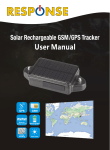
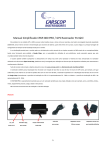
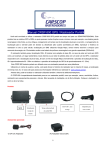
Product
USB Charging Wire
12/24V Car Adapter
The following is the optional accessory
12-24V DC Adapter
Home AC Adapter (USA)
Home AC Adapter (Europe)
Before Using
1.
Power ON / OFF
If the tracker is powered OFF, press and hold the SOS Button and release after the GREEN LED is ON,
then the tracker is powered ON.
If the tracker is powered ON, press and hold the SOS button until the GREEN LED flash quickly, release
the button, and press the SOS button 3 times quickly, then the GREEN LED will turn off and the tracker will
power OFF.
2.
Install SIM card
Pulling out the long narrow rubber stopple beside the tracker, you can see the SIM card socket, beside
which, press the yellow switch button with a tool and then the holder will come out. Pull it out and put the SIM
card in the holder and then push the holder into the tracker, (Pay attention to that the SIM card metal contact
pin can not face down to the holder) at last push the long narrow rubber stopple into the tracker to cover the
SIM card socket.
Note:
1> This tracker use 2G GSM network, and it upload tracking only through GPRS, it can not work in CDMA
-2-