1
Overview
Omniture’s Data Sources allows data to be imported into the Omniture platform for reporting and optimization. Once data is imported
via Data Sources, you can leverage the features of SiteCatalyst, SearchCenter, Discover, and Data Warehouse to optimize your business
and disseminate information. Additionally, these products may be used to analyze this data either separate from, or in addition to, data
collected directly from your Web site. The Data Sources Manager provides a number of advantages, including the following. You can:
•
•
•
•
Integrate multi-channel or offline data with data collected on your web site
Collect data from web servers, call centers or other systems and import it into the Omniture platform to utilize conversion, pathing
and unique visitor analysis
Analyze your custom data with powerful analytic tools
Optimize keyword bid management based on offline lead fulfillment through SearchCenter
When you activate data sources, you are letting Omniture know of your intent to submit your data to its servers. After you create a data
source, you will be given an FTP location that you can use to upload your data source files. When you upload these files, the Omniture
servers automatically locate and process them. When the processing is complete, the data displays in your reports.
Each type of data source has separate formatting requirements.To assist you with correct formatting, the data source wizard provides you
with a downloadable template that will assist you with formatting your data source information.
Additionally, SiteCatalyst provides you with an interface to let you track your data source uploads to see processing status, error
messages, or other data.
Accessing Data Sources
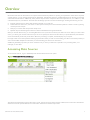
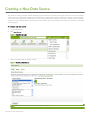
To access Data Sources, log in to SiteCatalyst and click the Data Sources menu option.
Figure 1: SiteCatalyst Data Sources Manager
The Data Sources Manager has three tabs used to create, manage and view historical usage of Data Sources. Each tab is described in
detail here. Each tab provides Data Sources information relative to the selected report suite.
SITECATALYST DATA SOURCES GUIDE
3