1
OPERATION CONTROLS AND FUNCTIONS
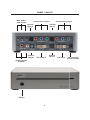
The HD Mate accepts two component and one DVI inputs with audio inputs on each.
The formats supported by these inputs are as follows:
COMPONENT
YPbPr
480p @ 50/60Hz
576p @ 50Hz
720p @ 50/60Hz
1080i @ 50/60Hz
1080p @ 50//60Hz
480i @ 60Hz
576i @ 50Hz
YCbCr
PC INPUT:
RGBHV
VGA/SVGA/XGA/SXGA/UXGA/WXGA/WSXGA/WUXGA
VGA@ (60//72/75/85/SVGA @ (56/60/72/75/85)
XGA @ (60/70/75/85)/SXGA @ (60/75/85)/UXGA @
60/WXGA @ 60(1280x800)/WSXGA @ 60(1680x1050)/
WUXGA @ 60(1920x1200)/1360x768
DVI INPUT:
Digital
VGA @ (60/72/75/85)/SVGA @ (56/60/72/75/85)/
XGA @ (60/70/75/85)/SXGA @ (60/75/85)/UXGA @ 60/
WXGA @ (1280x800)/WSXGA @ 60(1680x1050)/
WUXGA @ 60(1920x1200)/1360x768
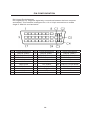
When connecting to a VGA PC source use a 15-pin D-sub cable to connect the output
of a PC to the DVI-I input connector of the HD Mate via a VGA to DVI.
When connecting to a component source (either SD or HD resolution) use a 3RCA to
3RCA cable to connect the YPbPr or YCbCr output of a DVD or Set Top Box to the
y-Cb/Pb-Cr/Pr input connector of the HD Mate.
When connecting to an HDMI source, use an HDMI to DVI cable to connect the HDMI
output of a STB or DVD to the DVI input connector of the HD Mate.
When connecting to a DVI source, use a DVI cable to connect to the DVI output of a
DVI source, such as a DVD or PC, to the DVI input of the HD Mate.
The HD Mate can automatically detect the input resolution of all three inputs.
4