1
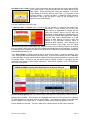
sorts can answer an endless array of questions: What are all the Monday through Friday feeds at 10
AM or what are all the feeds occurring on or after 9/8/2008 or how many feeds occur on SAT11 / Fixed
Dish 4, to name but a few. Master Data and Master Data Sort provide data templates that allow a user
to input high confidence, no conflict data to on-line feed scheduling applications.
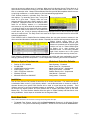
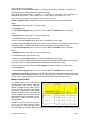
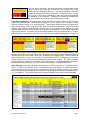
Feed Scheme produces a printable Daily Feed List
that displays – by ascending time of day – every feed
event on a given date. Display dates are user
assigned and may look days, weeks, months or years
in advance. Displayed events can be filtered to show
feeds for all delivery streams in a multi-channel
environment or only those feeds for a particular stream
– to show all feeds or only those feeds from satellites
or only those feeds from a network or only feeds from
a catch server, etc. A built in detector evaluates every displayed event for device conflicts and flags
each such conflict found. The Daily Feed List is used as an adjunct and cross-check for on-line feed
scheduling applications.
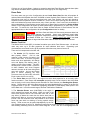
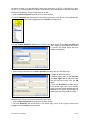
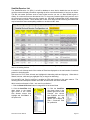
Feed Scheme’s built-in Satellite-Receiver database allows the user quick access to answers in the
often convoluted allocation of receivers to dishes. Especially for facilities with large antenna farms but
without L-band routing, filters in the
Satellite-Receiver database provide quick
answers to questions such as which digital
receiver can see a C Band GDMX signal
on Galaxy 16 or what receivers are
allocated to Dish 1 or how many Standard
Agile Omni receivers are in the system
and on which dishes are they located, etc.
Feed Scheme is designed to make resource allocation less painful and more predictable in the fast
changing landscape of feed acquisitions. It is an indispensible scheduling tool for feed coordinators.
Minimum System Requirements
{
Pentium III CPU, 930MHz
512 MB RAM
10 MB Default drive free space
SVGA Display – 32 bit
1024 x 768 Screen resolution
Windows XP/Vista
Microsoft Office/Excel 2003/2007
Installation
{
}
Worksheet Protection Defaults
Data Summary – Protected
Master Feed List – Unprotected
Master Feed List Sort – Unprotected
Daily Feed List Sort – Protected
Satellite-Receiver List – Unprotected
User Manual – Protected
Configuration – Protected
}
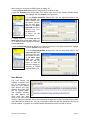
Run the Feed Scheme EXE installer file and follow its on screen instructions. The installer will specify
a destination folder on the C:\ [root] drive by default – use the Browse button to choose or create an
alternate directory from which Feed Scheme will be used in normal day-to-day operation. Feed
Scheme must run on an Excel equipped computer or workstation. The directory chosen for the install
will become the default location for Feed Scheme and its support documents (such as this User
Manual file). The Feed Scheme installer offers the option to create Desktop and Start Menu icons
during installation. It also drops an uninstaller into the Programs folder.
Quick Start Guide
{
}
Refer to details elsewhere in this document concerning the following Quick Start steps
1. To launch Feed Scheme, double click the Feed Scheme.xls filename in its Windows Explorer
directory or – if any were created during installation – double click a Feed Scheme shortcut icon.
Feed Scheme User Manual
Page 2