1
6
Development of a Novel Computer Application to Teach Counting in K-2 Classroom using the
Unified Process Method
teacher may click on any number and it will be hidden by
an Acorn. Clicking an Acorn will remove it, and the
number will appear again. In the bottom left the teacher
may select a stage for this puzzle based upon the level of
difficulty, with 1 being the easiest and 6 being the hardest.
The default stage is set to 1. Once the teacher has set the
stage and hidden all the numbers he/she wishes to hide,
the puzzle can be saved and added to the game. The
teacher can continue to create new basic puzzles or return
to the previous menu.
more on similar sequences but with different numbers
and difficulty levels. Patterned Puzzle design offers the
teacher a more flexible way to group or arrange puzzles
of different difficulty level in each stage of a game to
reinforce the students’ ability to count similar sequences
of numbers.
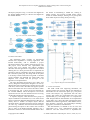
Fig.9. (a) The Patterned Puzzle Design in the Teacher Module
Fig.8. The Basic Puzzle design in the Teacher Module.
With the option of Patterned Puzzle, the teacher should
first create a pattern, for example, the orange boxes in Fig.
9, which contain only a subset of numbers that the teacher
want their students to work on. As the teacher clicks a
number, the box will turn orange, indicating it belongs to
a pattern. Clicking it again will return it back to a number.
Once the teacher has the desired pattern, he/she may click
Set Pattern at the bottom of the screen so that only the
pattern will be displayed.
To create puzzles based on this pattern, the teacher can
click on which numbers to hide, similar to the process of
creating a Basic Puzzle. Clicking on a number will cause
an Acorn to appear and hide the number while clicking an
Acorn will remove it and the number will appear again.
In the bottom left, the teacher may select a stage for this
puzzle based upon the level of difficulty, with 1 being the
easiest and 6 being the hardest. The default stage is set to
1 like in the Basic Puzzle design. Once the teacher has set
the stage and all the numbers he/she wishes to hide, the
puzzle can be saved and added to the game. The teacher
can continue to create a new Patterned Puzzle or return to
the previous menu to create a new pattern.
One of the advantages of using a Patterned Puzzle is
that the teacher can quickly create similar puzzles without
repeating the same process as that in the Basic Puzzle
design. Additionally, in the situation when students have
trouble solving puzzles that contain a certain type of
sequences, the teacher may want the students to practice
Copyright © 2015 MECS
Fig.9. (b) The Puzzle Created based on the Pattern.
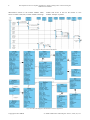
The Administration function in the Teacher Module
loads the Student List form as shown in Fig. 10 (a), with
which the teacher can add or delete students and view
student attempts of solved puzzles. The Add command
displays a new Student information form where the
teacher may fill out student information, such as Student
ID and Student Name, and meanwhile choose a Student
Level (See Fig. 10 (b)). Student Levels are set at 1 to 6
corresponding to the difficulty of the puzzles appropriate
for this student. The Ok command dismisses the Student
I.J. Modern Education and Computer Science, 2015, 10, 1-11