1
6. Appendix
Digital Projection M-Vision
Cine LED User Manual
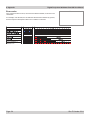
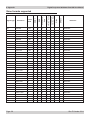
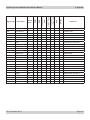
Troubleshooting
Problem
Possible solutions
The red ISSUE indicator is illuminated
continuously or flashing.
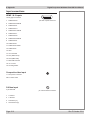
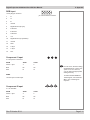
Check the Error codes detailed on the next page.
The projector will not power up.
Note that the blue POWER indicator light will be OFF when the projector is in
normal RUNNING MODE.
Check that the mains plug is plugged in and that the mains supply is switched on.
Check any external fuses or breakers.
The projector will not power up shortly
after being switched off.
To protect the LED module, the projector cannot be switched on when in it is in
cool-down mode. Wait until the power indicator shows steady blue. showing that it
is in standby mode.
The projector shuts down after it has
been in use for some time.
The projector may be overheating. Check that the air inlets and outlets are clear
of any obstruction.
See section 5. Maintenance, Cleaning the fans
It is possible to increase the speed of the fans for use in a high altitude
environment:
See section 4. Controlling the projector, System menu
No image is displayed.
Check that the input source is switched on and connected to the projector
correctly.
Check that the correct image source is selected.
Check that the brightness and contrast settings are set correctly.
See section 4. Controlling the projector, Using the control keys and Main
menu
The projector may be overheating. Check that the air inlets and outlets are clear
of any obstruction.
The image does not fit the screen
correctly.
Check that the projector and screen size are positioned correctly, and that the
zoom is adjusted correctly.
See section 2. Installation, Screen size vs throw distance
Check the aspect ratio setting.
See section 4. Controlling the projector, Main menus
Uneven image quality.
Check that the projector is parallel to the screen.
Check that the screen is flat, and securely mounted.
Page 6.2
Rev E October 2014