1
Key pad actions - Setup mode
Key pad actions - Setup mode
Key pad actions - Setup mode
NOTICE:
Read the safety precautions and the specification carefully.
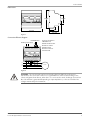
Connect wires according to the wiring diagram.
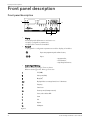
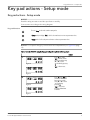
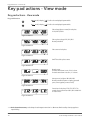
Key pad functions
To access Setup mode and to confirm setting value.
In Setup mode (in display: "PrG"): Scroll to the next function or increase parameter value.
In Setup mode: Scroll to the previous function or decrease parameter value.
NOTICE: To accept all changes you must enter the end parameter,see Figure 36: (page
13).
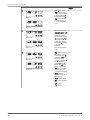
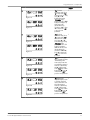
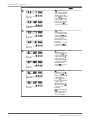
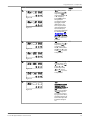
Table 1: Set the PAN311 using the key pad and go through the following steps:
Default
1.
L1
k
L2
W
M
L3
dmd Hz
PF var
dmd Hz
PF var
h
al
V
A
VA
al
V
A
VA
Figure 4
L1
k
L2
W
M
No
Press ‘S’ once, when
"A.rE" is shown, alarms
can be reset by pressing
▲ or ▼ to select
‘yes’.Confirm by pressing
‘S’.
"A.rE" = Alarm reset.
L3
h
Figure 5
2.
L1
k
L2
W
M
L3
dmd Hz
PF var
dmd Hz
PF var
h
al
V
A
VA
al
V
A
VA
Figure 6
L1
k
L2
W
M
L3
h
Press ‘S’, when "P.rE" is
shown. The Wdmd and
Amax can be reset by
using ▲ or ▼ to select
‘yes’. Confirm by
pressing ‘S’.
"P.rE" = Peak reset.
Resets the Wdmd max
and Amax.
No
Figure 7
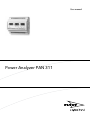
Power Analyzer PAN 311 User manual
9